How to Set the Memory Seat on a Volvo XC90?

Two drivers, one XC90, and a seat that seems to have a mind of its own — that’s usually not a glitch. It’s the key fob quietly doing exactly what it was designed to do, just not the way anyone expected.
TL;DR
- Setting a memory position is a two-button move: adjust the seat, press M, then press 1, 2, or 3 within three seconds.
- Recalling a saved position works differently depending on whether the door is open or closed — a quick press versus a press-and-hold.
- Your key fob is quietly tied to seat memory too — the car can auto-switch positions based on which fob unlocked it, which is usually helpful but occasionally confusing with multiple drivers.
- On 2016-and-newer XC90s, saving a position also saves your mirror and head-up display settings automatically.
- A seat position that keeps “resetting” itself is almost always a key fob or driver-profile mix-up, not a broken memory module.
How to Set the Memory Seat in a Volvo XC90
Adjust the seat to where you want it, press the M button, then press one of the numbered memory buttons within three seconds — that’s the entire process, and it’s been essentially unchanged since the original 2003 XC90. A Volvo owner and interior-tech writer who’s set up memory positions across both major XC90 generations walked through the exact steps and the key-fob quirks that trip people up.
Pull-quote: Setting a memory seat in the XC90 takes two button presses — remembering which fob controls which profile is the part that actually causes confusion.
Step-by-Step: Saving a Memory Position
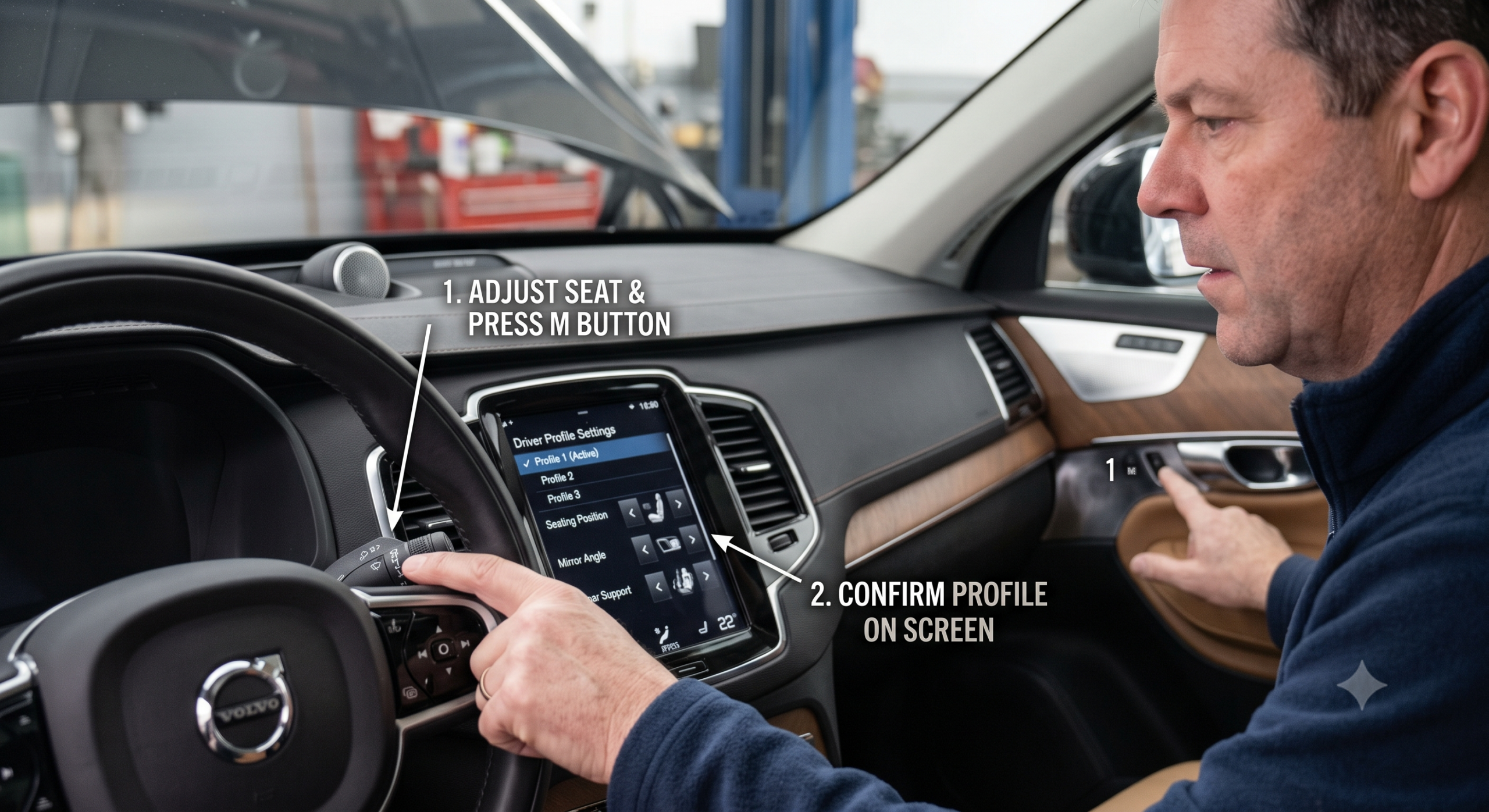
- <cite index=”143-1″>Adjust the seat, door mirrors, and head-up display (if equipped) to your desired position.</cite>
- <cite index=”143-1″>Push the M button and release it — the indicator light in the button will illuminate.</cite>
- <cite index=”143-1″>Within three seconds, press one of the numbered memory buttons (1, 2, or 3).</cite>
- <cite index=”143-1″>An audible signal confirms the position has been saved, and the light in the M button turns off.</cite>
<cite index=”143-1″>If you don’t press a numbered button within that three-second window, the M button simply turns off on its own and nothing gets saved — you’ll need to start over from adjusting the seat.</cite>
Quick Tip: The memory function keypad location varies by trim — <cite index=”143-1″>it’s positioned on either one or both front doors, depending on your specific XC90’s equipment level.</cite> If you can’t find it, check both doors before assuming your car doesn’t have the feature.
How to Recall a Saved Position
This part works differently depending on whether you’re standing outside the car or already sitting in it.
<cite index=”139-1″>If the front door is open, a quick press of the memory button moves the seat directly to the saved position.</cite> <cite index=”139-1″>If the front door is closed, you need to press and hold the memory button until the seat finishes moving into position.</cite>
Expert Insight: <cite index=”153-1″>Some owners find it genuinely odd that you have to hold the button the entire time the seat is moving rather than tapping it once — but that’s intentional, not a malfunction. It’s designed that way so the seat stops immediately if you release the button, which matters if something or someone is in its path.</cite>
What Gets Saved Along With the Seat Position
<cite index=”141-1″>Saving a preferred driver seat position on current XC90s automatically saves your current wing mirror positions and head-up display setting at the same time.</cite> <cite index=”141-1″>Saved positions for the passenger seat, by contrast, don’t affect the mirrors or head-up display.</cite>
On the original 2003–2014 XC90, the feature is more limited. <cite index=”150-1″>Only the driver’s seat is equipped with the memory function on this generation — the passenger seat doesn’t get memory buttons at all.</cite>
The Key Fob Connection (This Is Where It Gets Confusing)
Your memory positions aren’t just tied to M1, M2, and M3 — they’re also quietly linked to whichever key fob unlocks the car, and this is the single biggest source of “why does my seat keep changing” complaints.
On 2016-and-newer XC90s: <cite index=”144-1″>The seat position is independently saved to whichever key fob is used to lock the car, in addition to whatever’s stored in M1 and M2 — meaning the position tied to your fob could actually be different from what’s saved in your numbered memory buttons.</cite> <cite index=”142-1″>This system only works cleanly in the ideal scenario where the car starts locked and just one key approaches to unlock it — if another key fob is nearby or the car wasn’t locked first, it can switch to the wrong person’s profile.</cite>
On 2003–2014 XC90s: <cite index=”154-1″>The car remembers which remote was used most recently to lock it and applies that person’s settings the next time that remote unlocks the car — so if two people share the car and swap driving duties, each person typically needs to press their own memory button after getting in.</cite>
Real-world scenario: Picture a household where you and your partner share one XC90. You drive it Tuesday, lock it with your fob, and your seat position saves to your fob automatically. Wednesday, your partner drives it and does the same with theirs. If you then grab the wrong fob off the counter by mistake, you’ll get in to find your partner’s seat position waiting for you — not a malfunction, just the system doing exactly what it’s built to do.
Quick Tip: If seat settings feel unpredictable with multiple drivers in the household, look into “Protect Profile” mode on 2016-and-newer XC90s. <cite index=”145-1″>Locking a driver profile in Protect Profile mode helps ensure your stored positions stay put rather than getting overwritten by casual adjustments.</cite>
Troubleshooting a Memory Seat That Won’t Stay Put
The position resets every time you get in, even after saving it correctly: <cite index=”142-1″>This is often caused by profile-to-key-fob mixing, especially in households with more than one driver or more than one key nearby the car.</cite> Re-lock the car with only your intended fob nearby, then unlock and try again.
One specific setting (like lumbar support) keeps drifting even though the rest of the seat stays put: <cite index=”142-1″>Some owners report an individual component like lumbar support resetting on its own even when the broader seat position holds — pressing the memory button again restores it, though it may need to be repeated periodically rather than being a permanent one-time fix.</cite>
Nothing happens when you press M and then a number: Double-check you’re pressing the numbered button within the three-second window, since the system times out quickly by design. If the M button’s light never illuminates at all when pressed, that’s worth having checked, since it could point to an actual switch or wiring issue rather than user timing.
Pros and Cons by Owner Type
The Single-Driver Household
- Pro: Once set, the system is nearly invisible — your seat is simply always right where you left it.
- Con: There’s little reason to fully understand the key-fob/profile system until something unexpected happens.
The Two-Driver Household
- Pro: Each person can have their own fob-linked profile plus backup M1/M2 positions for a smoother handoff.
- Con: This is exactly the scenario most likely to trigger the “wrong profile loaded” confusion described above.
The Used-XC90 Buyer
- Pro: Testing the memory seat function during a test drive is a quick, free way to confirm the electronics are functioning properly.
- Con: A previous owner’s saved positions and fob associations may still be in the car’s memory, so don’t assume a “broken” seat position is actually broken — it might just be someone else’s saved setting.
FAQ
How do I set a memory seat position in my Volvo XC90? <cite index=”143-1″>Adjust the seat, mirrors, and head-up display to your preferred position, press the M button, then press one of the numbered buttons (1, 2, or 3) within three seconds to save it.</cite>
Why does my seat position keep changing when I get in the car? <cite index=”142-1″>This is usually caused by the car associating your seat position with a different key fob than the one you intended to use, especially if multiple fobs are near the vehicle.</cite>
Does the passenger seat have memory function too? <cite index=”150-1″>On the original 2003–2014 XC90, only the driver’s seat has memory function.</cite> <cite index=”141-1″>On 2016-and-newer XC90s, a memory-equipped passenger seat is available depending on trim, though its saved positions don’t affect the mirrors or head-up display the way the driver’s seat does.</cite>
Why do I have to hold the memory button instead of just tapping it? <cite index=”153-1″>This is intentional — holding the button lets the seat stop moving immediately if you release it, which is a safety measure rather than a design flaw.</cite>
How do I stop my seat settings from getting overwritten? Look into locking your driver profile using <cite index=”145-1″>”Protect Profile” mode, which is designed to keep your stored settings from changing due to casual adjustments made in the car.</cite>
Key Takeaways
- Saving a memory position takes two steps: adjust the seat, then press M followed by a numbered button within three seconds.
- Recalling a position works differently with the door open (quick press) versus closed (press and hold).
- Your key fob is quietly linked to seat memory too, which is the most common source of “my seat keeps changing” confusion in multi-driver households.
- On 2016-and-newer XC90s, saving driver seat memory also saves mirror and head-up display positions.
- The pre-2016 XC90 only offers memory function on the driver’s seat, not the passenger seat.
Next Step
Set up your M1 and M2 positions today if you haven’t already, and if you share the car with another driver, take a minute to sort out which fob belongs to whom to avoid the mixed-profile headache down the road.