How to Use the Odometer on Your 2016 Volvo XC90?

You just filled up the tank and want to track fuel economy from zero, but the reset button isn’t where you’d expect it — and no, it’s not a touchscreen tap.
This guide is compiled from Volvo’s official owner documentation for the second-generation (2016+) XC90, so the steps match your actual dashboard, not an older model’s layout.
TL;DR
- Your XC90 has two separate displays: the odometer (total lifetime mileage) and the trip meter (resettable distance tracking).
- The odometer can’t be reset — it’s a permanent lifetime total.
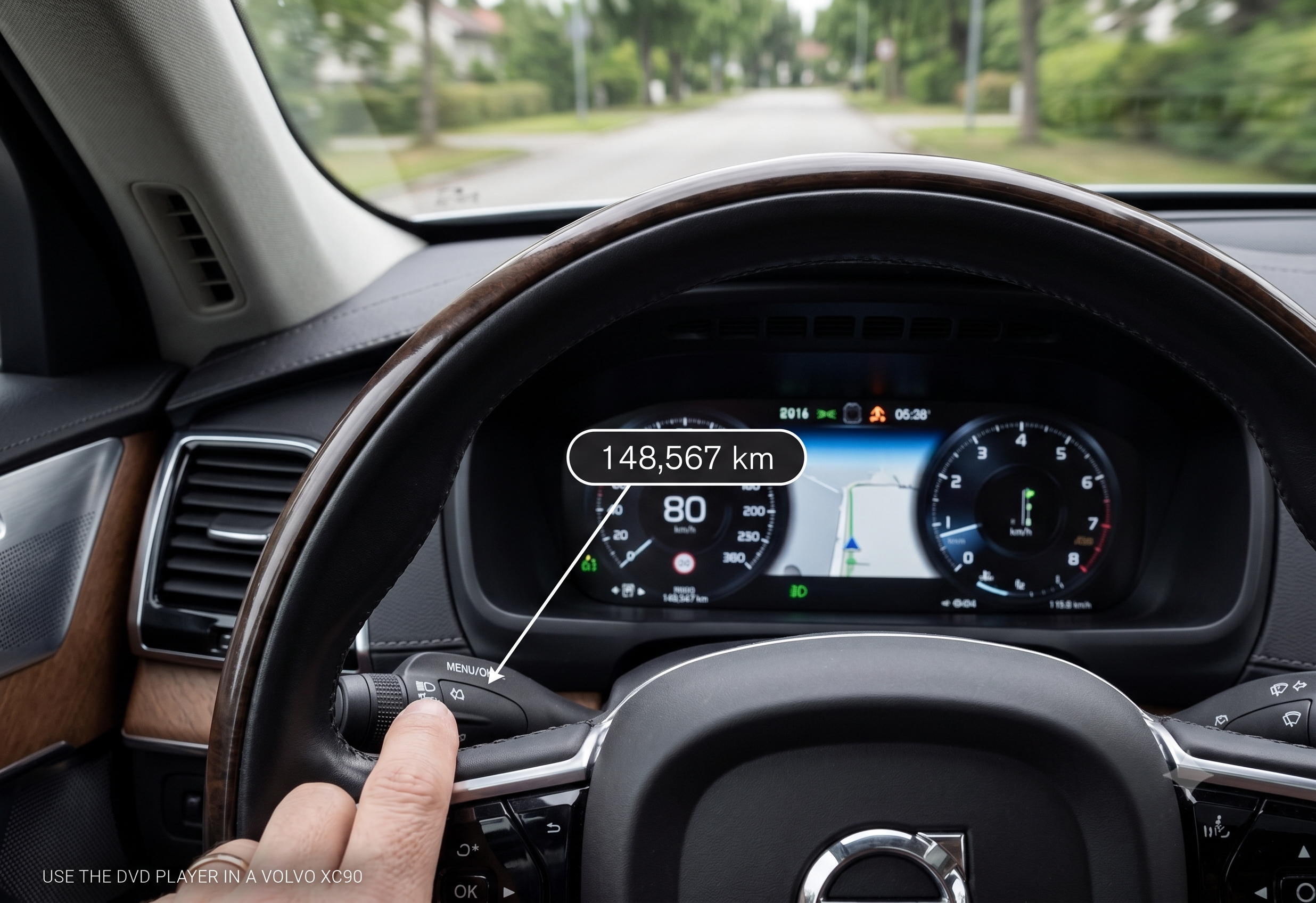
- The trip meter resets using a button on the end of the left steering wheel stalk, not the touchscreen.
- There are actually two trip meters: one you reset manually, one that resets itself automatically.
- You view trip data through the driver display, navigated with steering wheel controls.
Here’s the short answer: your total lifetime mileage sits in the standard odometer display and can’t be changed, while trip distance and fuel stats live in a separate trip meter that resets with a long press on the button at the end of the left steering wheel stalk.
Odometer vs. Trip Meter: What’s the Difference?
This trips up a lot of new owners, so it’s worth clearing up first. Your XC90 actually has a trip meter and an odometer, and they do very different jobs.
The odometer shows your car’s total driving distance since it left the factory, and it cannot be reset — it’s the number that matters for resale value and service intervals. The trip meter tracks distance, average fuel consumption, average speed, and driving time for a specific trip, and this is the one you’ll actually reset on a regular basis.
Quick Tip: If you’re trying to track fuel economy for a single tank or a road trip, you want the trip meter — not the odometer, which never moves back to zero.
How to View the Trip Meter
Your 2016 XC90’s trip and odometer information both live in the driver display, and getting there is done entirely through the steering wheel — no touchscreen required.
You can open the trip meter by pressing the confirm button on your steering wheel’s right-hand control panel. From there, use the scroll wheel or arrows to move between the different information screens, including trip distance, fuel economy, and average speed.
Bold takeaway: almost everything related to trip data is controlled from the steering wheel, not the center touchscreen — that’s the detail most new owners miss.
The Two Trip Meters Explained
Here’s the part that genuinely confuses people, according to owner forum discussions: your XC90 doesn’t have just one trip meter — it has two, labeled TM and TA in the manual.
Trip meter TM is the one you manually reset yourself, typically after refueling or at the start of a road trip. Trip meter TA works automatically in the background and resets itself only after the car sits unused for four hours or more — so it’s more of an “automatic per-outing” tracker than something you control directly.
Expert Insight: If you only ever check one trip meter, make it TM — it’s the one built for intentional tracking, like measuring fuel economy on a specific tank.
How to Reset the Trip Meter
This is the step that stumps most new owners, and it’s genuinely not obvious the first time.
- Use the right-hand steering wheel controls to navigate to the trip meter (TM) screen in the driver display.
- Locate the small button on the end of the left-hand steering wheel stalk — not on the wheel itself.
- Press and hold that button.
- All of TM’s information — mileage, average fuel consumption, average speed, and driving time — resets to zero.
A short press on that same button, rather than a long press, resets only the distance figure and leaves the other stats untouched.
Quick Tip: The reset button’s location genuinely isn’t intuitive — even owners who describe themselves as tech-comfortable have needed the manual to find it the first time.
Comparison: Odometer vs. Trip Meter TM vs. Trip Meter TA
| Feature | Odometer | Trip Meter TM | Trip Meter TA |
|---|---|---|---|
| Tracks | Total lifetime mileage | Distance, fuel use, speed, time for a chosen period | Same data, auto-tracked |
| Resettable? | No | Yes, manually via stalk button | No, only resets after 4+ hours idle |
| Best for | Resale value, service intervals | Tracking a specific trip or tank of gas | Passive daily driving overview |
The takeaway: if you want full control over what you’re measuring, TM is your tool — TA is more of a background convenience feature.
Real-World Scenario: Tracking Fuel Economy on a Road Trip
Say you’re heading out on a 400-mile road trip and want to know your actual fuel economy for the drive, not just the car’s running average since the last oil change. Right after you fill up at the first gas station, navigate to the TM trip screen and long-press the stalk button to zero everything out.
From there, your average fuel consumption and driving time will reflect only that stretch of driving — giving you a clean number to compare against your next fill-up, rather than a number muddied by weeks of mixed city and highway driving.
Pros & Cons by Owner Type
The Practical Commuter
- Pros: TA automatically tracks daily driving without any input needed
- Cons: Easy to forget it exists since it resets itself silently
The Road Trip Planner
- Pros: TM gives precise, resettable stats for a specific drive or tank of gas
- Cons: Requires remembering to manually reset it at the right moment
The Used-Car Buyer
- Pros: The odometer’s inability to be reset protects buyers from mileage tampering through the dash controls
- Cons: None from a buyer’s perspective — it’s a safeguard, not a downside
Alternatives Worth Considering
Steering wheel confirm button — choose this if you just want a quick glance at current trip stats without digging through menus.
Sensus touchscreen trip computer view — choose this if you prefer a larger, more detailed on-screen breakdown rather than the compact driver display.
FAQ
Can I reset the odometer on my 2016 Volvo XC90? No — the main odometer shows total lifetime mileage and cannot be reset; only the separate trip meter can be zeroed out.
Where is the trip meter reset button on a 2016 XC90? It’s a small button on the end of the left-hand steering wheel stalk, not on the touchscreen or wheel face itself.
What’s the difference between trip meter TM and TA? TM is manually reset by you, typically after refueling, while TA resets automatically once the car has been parked and unused for four or more hours.
Why won’t my trip meter reset when I press the button? Make sure you’re pressing and holding rather than tapping — a long press resets all trip data, while a short press only clears the distance figure.
How do I view my average fuel economy on the XC90? Navigate to the trip meter (TM) screen using your steering wheel’s right-hand controls; average fuel consumption is one of the values displayed there.
Key Takeaways
- The odometer tracks total lifetime mileage and can never be reset — that’s intentional.
- The trip meter (TM) can be manually reset for tracking specific trips or fuel tanks.
- A second trip meter (TA) resets itself automatically after four-plus hours of inactivity.
- The reset button lives on the end of the left steering wheel stalk, not the touchscreen.
- A long press resets all trip data; a short press clears only the distance.
Next Step
Next time you fill up, try navigating to the TM trip screen and long-pressing the left stalk button — it’s the fastest way to get a clean fuel economy reading for your next tank.