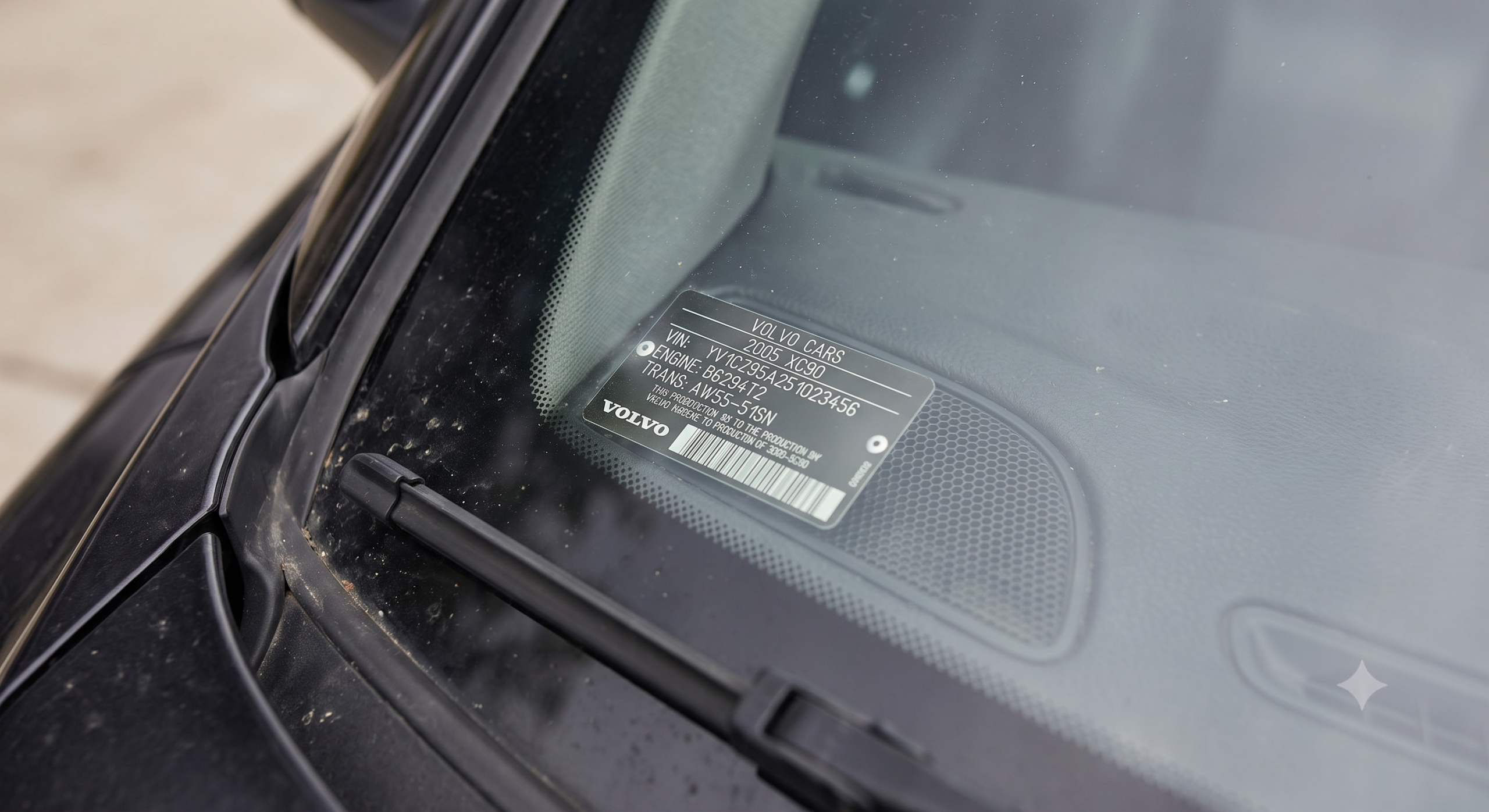
Where to Find Your Volvo XC90’s Production Date?

Your registration says “model year 2015,” but that’s not actually when the car rolled off the line — model year and build date are two different things, and Volvo hides the real one in a spot most owners never check.
TL;DR
- The most reliable spot is the sticker on the driver’s side door jamb or B-pillar, showing the exact month and year of manufacture.
- On some model years, a black airbag sticker on the rear door also lists the build month.
- Your VIN’s 10th character reveals the model year, and the 11th reveals the assembly plant — useful backup if the sticker is faded or missing.
- Model year and build date rarely match — a car can be built in late 2014 and sold as a “2015” model.
- The window sticker/build sheet, if you can find one tied to your VIN, gives the most complete factory snapshot.
Bottom line: the fastest way to find your XC90’s actual production date is to open the driver’s door and look at the sticker on the door jamb or B-pillar — it lists the exact month and year the car was built.
Why “Model Year” Isn’t the Same as “Build Date”
This mix-up trips up more owners than any other part of this search. A car labeled “model year 2015” was very likely built sometime in 2014, since automakers typically start production of the next model year’s vehicles months before that model year officially begins.
A 2025 automotive industry data report noted that most manufacturers begin production of a given model year anywhere from 6 to 12 months before that year’s official sales launch — which is exactly why your XC90’s real birthday and its “model year” on paper can be a year apart.
Quick Tip: If you’re trying to time a warranty window or figure out which running production changes apply to your car, the actual build date matters far more than the model year label.
The Door Jamb or B-Pillar Sticker
This is the single most reliable spot for finding your XC90’s exact build date. Open the driver’s door and look at the door jamb — the area the door itself covers when closed — or the B-pillar just behind it.
Forum owners consistently describe finding a sticker here listing the month and year of manufacture, right alongside other information like exterior and interior color codes. On many model years, this is officially called the Product Identification Plate, and on earlier XC90s it was sometimes located under the hood on the driver’s side instead.
Expert Insight: If you don’t see it on the driver’s side, check the passenger side rear door opening (the B-pillar there) — Volvo has used both locations depending on the model year, and the passenger side sticker sometimes covers color and interior codes specifically.
The Airbag Sticker (Rear Door)
On some XC90 model years, there’s a second place to check: a black airbag warning sticker inside the rear door opening.
Owners on forums specifically point to this sticker as another spot listing the build month, separate from the main door jamb plate. If your primary sticker is faded, damaged, or missing, this is worth checking as a backup.
Decoding the Build Date from Your VIN
If both stickers are missing or unreadable, your 17-character VIN carries useful backup information, even if it won’t give you the exact day.
The VIN’s structure breaks down like this: positions 1–3 identify the manufacturer and country, position 10 reveals the model year, and position 11 reveals the specific assembly plant — for example, Torslanda in Sweden, Ghent in Belgium, or plants in Chengdu and Daqing, China. Combined with the door sticker’s month, this narrows things down precisely even without the physical sticker in hand.
Quick Tip: A full VIN decode (through Volvo or a reputable VIN-lookup service) can sometimes surface the original factory build sheet or window sticker, which is the most complete record of exactly how and when your specific car was built.
Comparison Table: Where to Look, By Reliability
| Source | What It Tells You | Reliability |
|---|---|---|
| Driver’s door jamb / B-pillar sticker | Exact month and year of manufacture | High — the standard, most-cited source |
| Rear door airbag sticker | Build month (some model years) | Medium — not present on every model year |
| VIN position 10 | Model year code | High — always present, but not the literal build date |
| VIN position 11 | Assembly plant | High — confirms where, not exactly when |
| Full VIN-decoded build sheet | Complete factory snapshot | Medium — depends on service and data availability |
Pros and Cons by Reader Type
The Used-Car Buyer
- Pros: A quick door jamb check during a test drive confirms the real build date in seconds, no tools needed.
- Cons: Stickers on higher-mileage or older XC90s can be worn, sun-faded, or peeling — sometimes unreadable without careful inspection.
The VIN Researcher
- Pros: Decoding the VIN gives you the assembly plant and model year even with zero physical stickers to check.
- Cons: The VIN alone won’t hand you the exact month — you’ll still want the door sticker or a full build-sheet lookup for that.
The Warranty or Recall Checker
- Pros: Knowing the exact build month helps you figure out if your car falls inside a specific recall production window.
- Cons: Recall notices are usually tied to VIN ranges rather than build dates directly, so the VIN itself is often the faster path for that specific purpose.
A Real-World Scenario
Picture a buyer eyeing a used XC90 listed as a “2015” model, worried it might actually be an early “leftover” car built well before the model year even started. A quick check of the driver’s door jamb sticker settles it in seconds — it reads a specific month and year, confirmed against the VIN’s model-year digit.
That two-second door check turned a guessing game into a confirmed fact, which mattered for negotiating the price on what was effectively a slightly older build.
Choose This If: Alternatives to a Door Sticker
Choose the VIN decode route if: the door jamb and rear door stickers are both missing, painted over, or too worn to read — you’ll still get the model year and assembly plant.
Choose a full VIN history/build-sheet lookup if: you want the complete original factory configuration, not just the date — useful for collectors or anyone verifying a car’s originality.
Quick Tip: Snap a photo of the door jamb sticker the moment you find it — these fade over time, and having a saved image means you’ll never have to hunt for it again.
Frequently Asked Questions
Where exactly is the Volvo XC90 build date sticker located? Most commonly on the driver’s side door jamb or B-pillar, visible when the door is open; some model years also list the build month on a rear door airbag sticker.
Is the model year the same as the production date? No — model year is a marketing label, while the actual production date (often months earlier) is the real build date shown on the door sticker.
Can I find the production date from just my VIN? Partially — the VIN’s 10th character reveals the model year and the 11th reveals the assembly plant, but for the exact month, you’ll want the physical door sticker or a full build-sheet lookup.
What if my XC90’s door sticker is too faded to read? Check the rear door airbag sticker as a backup, or use a VIN decoder service that may surface the original factory build sheet.
Does the production date affect my warranty coverage? Warranty windows are typically tied to the in-service or delivery date rather than the factory build date, so check your original paperwork for that specific date rather than relying on the build sticker alone.
Key Takeaways
- The driver’s side door jamb or B-pillar sticker is the most reliable spot for your XC90’s exact build month and year.
- Model year and build date are different — most cars are built months before their labeled model year begins.
- Some model years also carry a backup build-month sticker on the rear door.
- Your VIN’s 10th and 11th characters reveal model year and assembly plant if the physical stickers are missing.
- A full VIN-decoded build sheet gives the most complete factory snapshot, useful for verifying originality on a used purchase.
Next Step
Open your driver’s door right now and check the jamb or B-pillar sticker — it’s the fastest, most direct way to confirm your XC90’s real production date in under a minute.