How to Remote Start a Volvo XC90?

Nothing beats climbing into a Volvo XC90 that’s already warm (or already cool) because you started it from your kitchen window five minutes earlier. The tricky part is that Volvo offers two different ways to do this — key fob and app — and they don’t always work the same way across every model year. I’ve researched Volvo’s documented remote start procedures across XC90 generations, and the exact steps genuinely vary enough by year that it’s worth confirming which method your specific car supports.
TL;DR
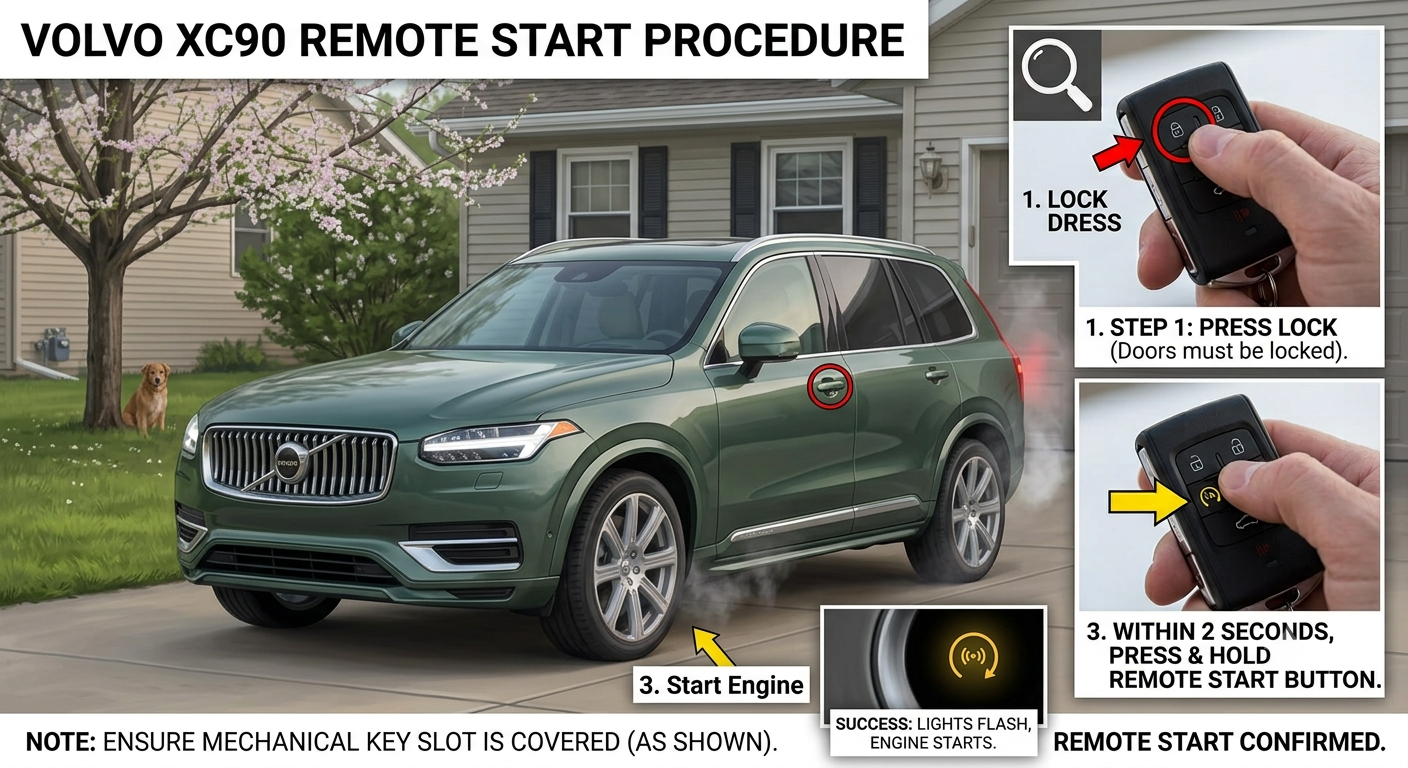
- Key fob method: Press the Lock button, then immediately hold the Approach Light button (the little light bulb icon) for about 2 seconds.
- App method: Open the Volvo Cars app, select your XC90, tap the remote start/climate icon, and confirm — this generally has better range since it uses a data connection instead of radio signal.
- Remote start typically runs for 5-15 minutes and shuts off automatically if the car isn’t unlocked or driven.
- Most fobs can activate remote start up to 2 times in a row before you need to physically start the car with the key.
- Not every XC90 fob or trim supports this — you may need a specific 5-6 button remote or an app subscription depending on your model year.
The Core Answer (in Under 200 Words)
To remote start a Volvo XC90 using the key fob, make sure the vehicle is locked, then press the Lock button followed immediately by holding down the Approach Light button (the light bulb icon) for about two seconds. You should see the turn signals flash or hear a chime confirming the engine has started.
To remote start using the Volvo Cars app, open the app, log into your Volvo ID, select your vehicle, and tap the remote start or climate icon from the home screen. The app version generally works from much farther away since it relies on your phone’s data connection rather than the fob’s short-range radio signal. Either way, the car needs to be parked, in Park, and locked before either method will work.
Pull-quote: “The app has better range than the fob for one simple reason: it doesn’t need to be anywhere near your car to work.”
Why the Button Sequence Isn’t Always the Same
Volvo’s remote start button layout has changed across XC90 model years and fob types, which is the source of a lot of owner confusion. Documented dealer guidance confirms the general sequence — Lock, then hold the Approach Light button for roughly two seconds — but some older or lower-trim fobs simply don’t include the extra button needed for this function at all.
If your fob only shows buttons for lock, unlock, rear gate, and an emergency alert, you’re likely missing the remote-start-capable button entirely, and no button combination will make it work. In that case, remote start is only accessible through the app, provided your XC90 has an active Volvo On Call or Volvo Cars app subscription.
Quick Tip: Count your key fob’s buttons before troubleshooting. If you only see four, remote start via fob likely isn’t available on your remote — the app is your only path.
Setting Up and Using the App Method
The Volvo Cars app is generally the more reliable and longer-range option, especially for newer XC90 models. After downloading the app and creating or logging into your Volvo ID, you’ll need to link your specific XC90 to your account, which can take a few minutes to sync the first time.
Once linked, navigate to the home tab, find the remote start or climate function, and tap to activate it — you can typically also set your desired cabin temperature or pre-condition heated seats before you even step outside. Keep in mind Volvo places some limits on repeated use: the function generally activates for 5-15 minutes and can only be triggered twice in a row before the vehicle needs to be started normally with the key.
Here’s how the two methods compare:
| Key Fob Method | Volvo Cars App | |
|---|---|---|
| Range | Short (line of sight/near vehicle) | Works anywhere with data connection |
| Requires | 5-6 button fob with Approach Light button | Active app account, sometimes a subscription |
| Setup needed | None | App download, account linking |
| Repeat use limit | Typically 2 times in a row | Typically 2 times in a row |
| Extra features | None | Climate pre-set, vehicle finder, health checks |
Pros & Cons by Reader Type
Owner with a full-featured 5-6 button key fob
- ✅ No app, subscription, or phone needed — works directly from the fob
- ✅ Faster for quick, close-range starts (like from your driveway)
- ❌ Limited range compared to the app
Owner relying on the Volvo Cars app
- ✅ Works from virtually any distance with a data connection
- ✅ Extra features like vehicle finder and pre-set climate control
- ❌ Requires setup, an account, and possibly an active subscription depending on model year
Owner whose remote start isn’t working at all
- ✅ Usually a simple fix — check fob battery, button count, or app subscription status
- ❌ Some fobs and trims genuinely don’t support remote start without an aftermarket accessory or fob upgrade
Real-World Scenario
Picture a cold winter morning where you want your XC90 running and toasty before you even step outside. Documented guidance confirms the key fob’s short range means you’ll generally need to be relatively close to the vehicle for that method to work — but the app can be triggered from your kitchen table, or even from another location entirely, since it only needs your phone’s data connection rather than a radio signal reaching the car.
That’s the practical reason the app tends to be the more popular method for genuinely “remote” starts, while the fob works better as a quick trigger from just outside your door.
Alternatives Worth Considering
- Use the fob if you’re already close to the vehicle and want a fast, no-app-needed option.
- Use the app if you want to start the car from well outside fob range, or want extra features like climate pre-setting and vehicle location.
FAQ
Why won’t my Volvo XC90 key fob remote start the engine? Check your fob’s button count first — if it only has four buttons, it likely lacks the Approach Light button needed for this feature, and you’ll need the app instead.
How long does remote start run before shutting off? Typically 5-15 minutes, and it shuts off automatically if the vehicle is unlocked or not started normally afterward.
Can I remote start my XC90 more than once in a row? Most systems allow up to two consecutive remote starts before requiring a normal key-based start.
Does the Volvo Cars app cost extra to use for remote start? It depends on your model year — some XC90s include a complimentary subscription period, while other model years or features may require an active paid subscription.
Is remote start available on every XC90 model year? No — it’s generally available from around 2016 onward depending on trim, but always double-check your specific fob and app compatibility.
Key Takeaways
- The key fob method requires pressing Lock, then holding the Approach Light button for about two seconds.
- The Volvo Cars app offers longer range and extra features like climate pre-setting and vehicle location.
- Remote start typically runs 5-15 minutes and can be triggered twice in a row before needing a normal key start.
- A four-button fob likely doesn’t support remote start — the app is your fallback in that case.
- Availability varies by model year and trim, so confirm your specific XC90’s capability if you’re troubleshooting.
Next Step
Check your key fob’s button count first, then download the Volvo Cars app and link your XC90 if you want a longer-range remote start option.