How to Replace the Battery in a Volvo Key Fob?

That moment when your Volvo key fob suddenly needs three presses to unlock the door, or stops working entirely, usually means one simple thing: the battery’s dying. The good news is this is a genuinely easy fix you can do yourself in a few minutes, without a trip to the dealership. I’ve researched Volvo’s official battery replacement guidance alongside several independent step-by-step procedures, and the process is consistent enough across models that most owners can handle this confidently.
TL;DR
- Most modern Volvo key fobs (XC90, XC60, XC40, S90, V90, and similar) use a CR2032 3V battery.
- The process involves sliding a release catch to remove the front cover (revealing the emergency key blade), then a second catch to remove the back cover and access the battery.
- You generally don’t need to reprogram the fob after a battery swap — it should work immediately.
- If your Volvo won’t start with a dead fob, you can usually hold the fob directly against the start button while pressing the brake, since a passive chip still communicates even without battery power.
- Signs of a dying battery include reduced range, needing to press buttons multiple times, or a dashboard “key battery low” message.
The Core Answer
Replacing a Volvo key fob battery is a simple, at-home job that takes just a few minutes. Most modern fobs use a CR2032, 3-volt coin cell battery, though it’s worth checking your owner’s manual or the old battery’s markings to confirm, since some older or different-model fobs use a CR2025 or CR2450 instead.
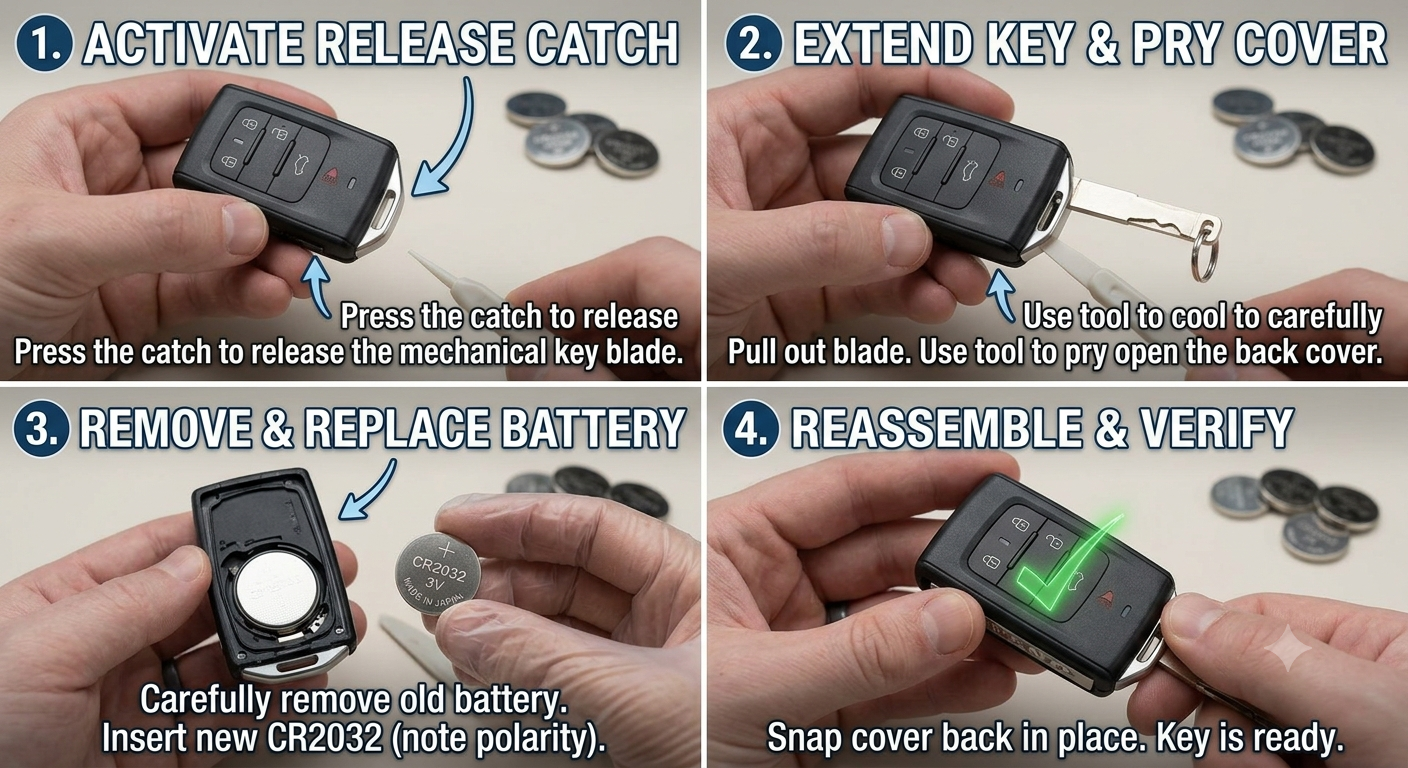
The general process: locate the release catch near the key-ring loop, slide it to remove the front cover (which reveals the emergency key blade), then find a second catch to release the back cover and expose the battery. Swap the old battery for a new one in the same orientation, typically positive side up, then reassemble by reversing the steps until you hear the covers click securely into place.
Pull-quote: “A key fob battery swap is genuinely a three-step job: open it, swap it, close it.”
Why This Is Safe to DIY
Unlike reprogramming a remote, a simple battery swap doesn’t touch the fob’s pairing with your car. Volvo’s own support documentation and independent guides consistently confirm you generally won’t need to reprogram the fob after installing a new battery — it should resume normal function immediately, since the battery only powers the transmitter, not the underlying security code stored in its chip.
The main risks worth being careful about are physical: forcing the plastic covers too hard can snap the small retention tabs, and touching the battery’s flat surfaces with bare fingers can leave oils that degrade the electrical contact over time.
Quick Tip: Hold the new battery by its edges only, and avoid touching the flat top and bottom surfaces — skin oils can reduce contact quality and shorten battery life.
Step-by-Step: Replacing the Battery
For most rectangular “brick-style” Volvo fobs used on the XC90, XC60, XC40, S90, and V90, here’s the general procedure:
- Hold the fob with the Volvo logo facing you and the key-ring loop toward you.
- Locate the release catch near the key-ring loop (often a black spring-loaded slider).
- Slide the catch to release the front cover and remove it — this reveals the mechanical emergency key blade.
- Flip the fob over to the non-logo side and locate a similar catch on the back cover.
- Slide the second catch to release the back cover, then lift it off gently.
- Remove the old battery, noting which side faced up before removing it.
- Insert the new CR2032 battery in the exact same orientation, typically positive (+) side facing up.
- Reassemble by reversing the steps — press the covers back into place until you hear them click securely, with no gaps remaining.
- Test the fob at both close and greater distances to confirm normal function.
Here’s a quick reference for common issues after replacement:
| Symptom After Battery Change | Likely Cause | Fix |
|---|---|---|
| Fob still unresponsive | Battery inserted backward | Reopen and check polarity |
| Works only at very close range | Dirty contact points | Clean with a cotton swab and small amount of rubbing alcohol |
| Intermittent function | Battery not seated fully | Reopen and press firmly into place |
| Completely dead, correct battery installed | Rare pairing issue | Contact a Volvo service center for diagnostics |
Pros & Cons by Reader Type
Owner comfortable with basic DIY tasks
- ✅ Takes just a few minutes with a single inexpensive battery
- ✅ No reprogramming needed in the vast majority of cases
- ❌ Risk of snapping small plastic tabs if covers are forced open too aggressively
Owner who accidentally let the battery fully die
- ✅ Most modern Volvos still let you start the car by holding the fob against the start button while pressing the brake
- ✅ The Volvo Cars app can remotely unlock and start the car as a backup
- ❌ The manual key blade access under the door handle takes a bit of getting used to if you’ve never used it
Owner unsure which battery type their fob needs
- ✅ CR2032 covers the vast majority of current Volvo models
- ❌ Some models or valet keys may use a CR2025 or CR2450 instead — worth confirming before buying a replacement
Real-World Scenario
Picture noticing your XC90’s fob needs three presses to unlock the door lately, and a small dashboard message flashes about the key battery being low. Rather than heading to the dealership, you grab a $2 CR2032 battery, follow the release-catch sequence to open both covers, swap the battery with the same orientation as the old one, and snap it back together — the fob works normally again within minutes, no reprogramming required.
Compare that to letting the battery die completely before addressing it: you’d still be able to get in and start the car using the emergency key blade and the fob-to-start-button trick, but you’d rather not learn that process for the first time while running late somewhere.
Alternatives Worth Considering
- Use the Volvo Cars app if your fob battery dies completely and you need immediate access — it can remotely unlock and start the vehicle as a stopgap.
- Visit a Volvo service center if a fresh battery doesn’t resolve unresponsiveness — this can point to a deeper pairing or transmitter issue beyond a simple battery swap.
FAQ
What battery does a Volvo key fob use? Most modern Volvo key fobs (XC90, XC60, XC40, S90, V90) use a CR2032, 3-volt coin cell battery — confirm with your owner’s manual for your specific model.
Do I need to reprogram my key fob after changing the battery? No, in the vast majority of cases — the fob should work immediately since the battery only powers the transmitter, not its stored pairing code.
How long does a Volvo key fob battery typically last? Usually two to five years, depending on how frequently the fob is used.
What if my key fob battery is completely dead and I can’t unlock my car? Use the mechanical emergency key blade hidden inside the fob to unlock the driver’s door manually, or use the Volvo Cars app if you have it set up.
Can I still start my Volvo with a fully dead key fob battery? Often yes — holding the fob directly against the engine start/stop button while pressing the brake can let the car’s system detect the fob’s passive chip even without battery power.
Key Takeaways
- Most modern Volvo key fobs use a CR2032 3V battery, replaceable at home in a few minutes.
- The process involves sliding two separate release catches to open the front and back covers.
- Reprogramming generally isn’t needed after a simple battery swap.
- A completely dead battery still allows car access via the manual key blade or the fob-to-start-button method.
- Clean contact points and correct battery orientation resolve most post-replacement issues.
Next Step
Check your fob’s existing battery markings or your owner’s manual to confirm you need a CR2032, then pick one up and follow the release-catch steps above.