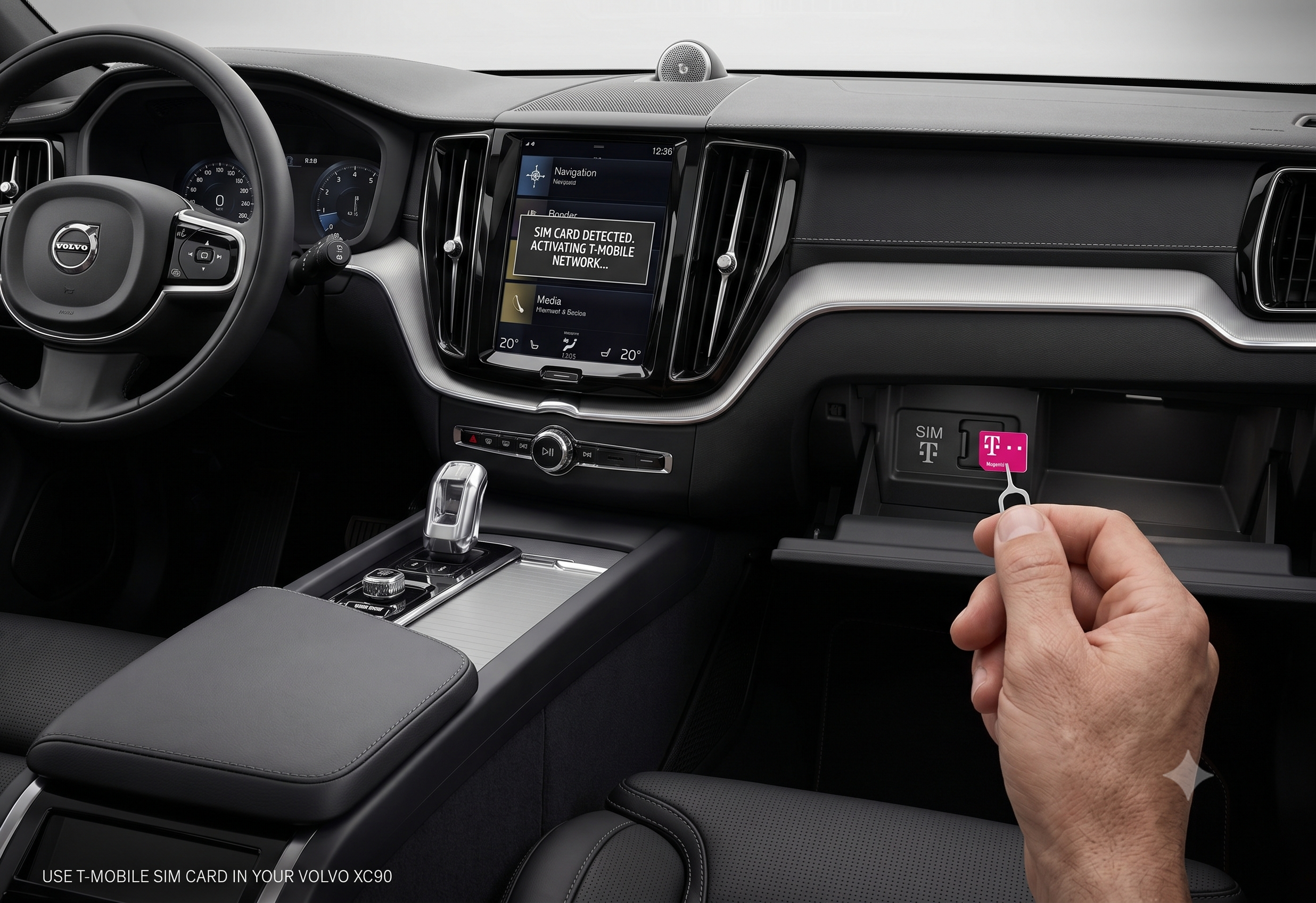
How to Use a T-Mobile SIM Card in Your Volvo XC90?

Your Sensus-era XC90 came from the factory with an AT&T SIM buried in its modem — and yes, plenty of owners have swapped it for T-Mobile instead. Here’s how, and where the compatibility gets tricky.
Before going further: this is an owner workaround, not something Volvo supports or documents. It works reliably for many Sensus Connect–era owners, but expect some trial and error, and understand you’re outside official support if something goes wrong.
TL;DR
- This applies to Sensus Connect XC90s (roughly 2016–2021) — 2022+ Google Built-In models don’t have a swappable SIM slot for this purpose.
- The XC90’s built-in modem ships with a factory AT&T SIM in the US, tied to Volvo’s data plan.
- Owners have had success swapping in a T-Mobile SIM, but need to manually set the APN to fast.t-mobile.com for it to connect.
- The SIM slot is typically in the passenger footwell or center console, separate from the smaller Volvo On Call telematics SIM elsewhere in the car.
- This SIM only powers apps, streaming, and the in-car WiFi hotspot — Volvo On Call safety and remote features run on a separate connection and don’t depend on it.
Do You Actually Need a Third-Party SIM Card?
Before swapping anything, it’s worth confirming you actually need this. A lot of what people assume requires the car’s SIM doesn’t.
<cite index=”76-1″>Volvo On Call has its own SIM card and separate modem, and it will work even without a regular internet connection for other apps</cite> — so your remote start, remote lock, and emergency features aren’t at risk either way. <cite index=”72-1″>Services like traffic data for navigation, sending a destination to the car, remote start, and the driving journal will work without you installing any SIM at all, since the car has its own built-in data connection it falls back on</cite>.
What a third-party SIM actually adds is data for in-car streaming apps (Spotify, Pandora, TuneIn) and the WiFi hotspot feature for passengers’ devices. <cite index=”75-1″>Many owners find they don’t need this at all if they’re already using CarPlay or Android Auto, since those pull data through the connected phone instead</cite>.
Quick Tip: If your main goal is just giving backseat passengers WiFi on a road trip, a simple travel router paired with your phone’s hotspot can be a lot less hassle than modifying the car’s own SIM setup.
Where the SIM Slot Is Located
The slot you’re looking for is specifically for the car’s infotainment modem — not the smaller telematics module used for Volvo On Call.
<cite index=”76-1″>On Sensus-era XC90s and XC60s, the SIM used for infotainment and the in-car WiFi hotspot is mounted in a compartment near the passenger footwell</cite>. This is separate from <cite index=”76-1″>the telematics system’s own modem and SIM, hidden away in the luggage compartment, which handles Volvo On Call</cite>. Don’t confuse the two — swapping the wrong SIM won’t get you the result you want.
How to Swap In a T-Mobile SIM Card
Once you’ve located the correct slot, the physical swap is simple. Getting it to actually connect is where most of the extra steps live.
Step 1: Get a T-Mobile SIM sized correctly for the car’s modem tray. <cite index=”69-1″>T-Mobile typically supplies their SIMs as 3-in-1 cards that can be punched out to the correct size</cite>, so confirm you’re using the right size for your car’s tray before inserting it.
Step 2: Remove the factory SIM and insert the T-Mobile SIM. Access the compartment near the passenger footwell, swap the card, and make sure it’s seated fully.
Step 3: Set the correct APN. This is the step that trips people up. <cite index=”73-1″>You’ll need to get into the car’s modem settings and change the access point name to fast.t-mobile.com to get connected</cite>. Without this, the car may see the SIM but fail to establish a data connection.
Step 4: Confirm the connection in Sensus. Check your infotainment system’s data or WiFi hotspot status to confirm you’re online, then test with a streaming app or the hotspot itself.
Expert Insight: <cite index=”73-1″>One owner reported successfully using a T-Mobile SIM in their Volvo this way, and confirmed you don’t need to port any phone number, since the number is associated with the SIM itself</cite> — so there’s no carrier paperwork beyond getting an active T-Mobile data SIM.
Why Results Vary by Owner
This isn’t a universally guaranteed fix, and forum reports show real inconsistency worth knowing about upfront.
<cite index=”69-1″>One XC90 T8 owner who called T-Mobile directly was told their SIM wasn’t associated with an LTE device on T-Mobile’s end, suggesting the car’s modem may not be provisioned for LTE speeds depending on carrier and trial status</cite> — despite that, <cite index=”69-1″>they still measured download speeds ranging from roughly 14 to 45 Mbps and upload speeds of 10–12 Mbps in real-world testing</cite>, which is perfectly usable for streaming and hotspot use even if it’s not officially “LTE” on paper.
Carrier and modem compatibility can also shift over time as networks evolve. <cite index=”73-1″>Some owners specifically timed their switch to T-Mobile around AT&T’s 3G network shutdown in early 2022</cite>, since older modems that couldn’t fall back to newer network bands lost connectivity entirely on some carriers.
Comparison: Sensus Connect vs. Google Built-In XC90 SIM Support
| Feature | 2016–2021 XC90 (Sensus Connect) | 2022+ XC90 (Google Built-In / AAOS) |
|---|---|---|
| User-accessible SIM slot | Yes, in passenger footwell/console area | Physical slot may be present but reported hardware-disabled |
| Third-party SIM swap | Reported working by owners (with APN changes) | Not functional per owner reports |
| Primary data connection | Swappable physical SIM | Fixed eSIM tied to Volvo’s connectivity program |
| Data plan flexibility | User can choose carrier | No — locked to Volvo’s contracted carrier partner |
Pros and Cons by Owner Type
The Road-Trip Family
- ✅ In-car WiFi hotspot with T-Mobile data can be cheaper than adding hotspot capacity to every phone plan
- ✅ Kids can stream independently of the driver’s phone data
- ❌ Setup requires manually configuring the APN, which isn’t beginner-friendly
The Tech-Savvy Owner Who Already Uses CarPlay/Android Auto
- ✅ May not need a car SIM at all, since phone-based apps already pull data through the connected phone
- ❌ Sensus-native apps (Pandora, Spotify through the car’s own interface) still need the car’s own connection to work independently of a phone
The 2022+ Google Built-In Owner
- ❌ Third-party SIM swap isn’t a viable option on this generation based on current owner reports
- ✅ Built-in eSIM connectivity works out of the box without any user configuration, even if it’s less flexible
Frequently Asked Questions
Does Volvo officially support using a T-Mobile SIM? No. Volvo’s connected services in the US are contracted through a specific carrier partner (historically AT&T for Sensus-era vehicles), and third-party SIM swaps are an owner workaround documented mainly through enthusiast forums, not Volvo support channels.
Will a T-Mobile SIM affect Volvo On Call or remote start? No — those features run through a separate telematics SIM and modem, independent of whichever SIM powers your infotainment data and hotspot.
Do I need to port a phone number to use a T-Mobile SIM in my XC90? No. The data connection is tied to the SIM card itself, not a phone number, so there’s nothing to port.
Can I do this on a 2023 or newer XC90? Based on current owner reports, no — newer Google Built-In models use a fixed eSIM for connectivity rather than a swappable physical SIM, even where a physical slot still exists in the hardware.
What size SIM does the XC90 modem take? Owners report success punching a T-Mobile 3-in-1 SIM card down to the correct size for the car’s tray — confirm the exact size needed for your specific model year before purchasing a SIM.
Key Takeaways
- This workaround applies to Sensus Connect XC90s (roughly 2016–2021) — not the newer Google Built-In generation.
- The infotainment SIM slot is separate from the Volvo On Call telematics SIM, and only affects apps and the WiFi hotspot.
- Setting the APN to fast.t-mobile.com is the critical step most owners miss on the first try.
- Speeds and LTE provisioning can vary by carrier and even by individual SIM, based on real owner reports.
- This isn’t Volvo-supported — proceed knowing you’re relying on community troubleshooting, not official documentation.
Next step: Confirm your XC90’s model year and infotainment generation before ordering a SIM — Sensus Connect and Google Built-In XC90s handle this completely differently.