Does the Volvo C40 Have Apple CarPlay? Full Integration & Setup Guide

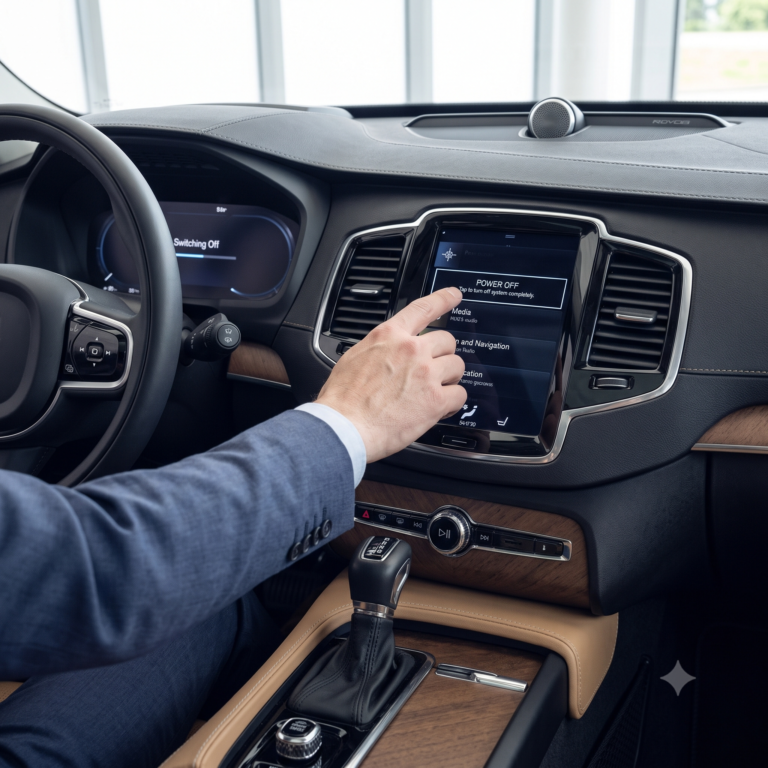
The all-electric Volvo C40 Recharge features full Apple CarPlay integration. Supported across all trim levels (Core, Plus, and Ultimate), CarPlay connects via a physical USB-C cable plugged into the dedicated white-ringed front console port. It was deployed to Android Automotive OS via Software Version 2.2 and supports high-definition display tiling, Siri voice activation, and Apple Maps turn-by-turn guidance projected directly into the 12.3-inch digital driver cluster.
Wired via USB-C (White-Ringed Port)
Apple Maps Turn-by-Turn Supported
Volvo Software 2.2 or Later
Requires Certified Aftermarket Adapter
Apple CarPlay on the Pure Electric Volvo C40 Recharge
When Volvo introduced the sleek, coupe-styled C40 Recharge as its first dedicated pure-electric crossover, it launched with an embedded operating system co-developed with Google: Android Automotive OS (AAOS). In early production models (early 2022 builds), Apple CarPlay was initially absent, leading to widespread confusion among iPhone-toting luxury buyers.
However, Volvo resolved this rapidly via global Over-The-Air (OTA) updates. Starting with Software Release 2.2, Apple CarPlay became a permanent, fully integrated feature of the C40 Recharge. Today, every C40 operating on modern software offers an exceptional, high-definition CarPlay experience that blends iOS convenience with Scandinavian design.
Select your iPhone model and connection preference to examine projection capabilities, digital cluster behavior, and charging speeds.
Full Turn & Geometry
0ms (Zero Lag)
15W USB-C Fast Charging
Volume, Track & Siri
How to Connect & The Importance of the White-Ringed Port
Unlike older vehicles with standard USB-A rectangular slots, the Volvo C40 utilizes high-speed USB-C connections exclusively. Proper port selection is mandatory for CarPlay communication:
Dual-Screen Projection: Apple Maps in the Driver Display
One of the finest features of Volvo’s CarPlay implementation is cluster mirroring. In most competitor vehicles, Apple CarPlay is trapped on the center dashboard display. In the C40 Recharge, Volvo leverages Apple’s second-screen API:
- When using Apple Maps for active navigation, your turn-by-turn guidance, distance countdowns, lane-change graphics, and dynamic street geometry are rendered directly onto the 12.3-inch digital driver cluster behind the steering wheel.
- This eliminates the need to glance sideways at the center dashboard while navigating complex metropolitan interchanges or roundabouts.
- Note on Third-Party Apps: Due to Apple’s API constraints, third-party apps like Google Maps via CarPlay or Waze will only display on the 9-inch center screen; they cannot push vector maps into the instrument cluster.
Technical Comparison: CarPlay vs Native Google AAOS
| Feature / Specification | Wired Apple CarPlay (OEM) | Wireless Adapter (Dongle) | Native Google Built-in |
|---|---|---|---|
| Hardware Connection | USB-C white-ringed port | USB-C adapter + 5GHz Wi-Fi | Embedded Snapdragon Automotive SoC |
| Driver Cluster Map Support | Yes (Apple Maps only) | Yes (Apple Maps only) | Yes (Full Google Maps satellite & HUD) |
| Voice Assistant Engine | Apple Siri (Long press mic) | Apple Siri (Long press mic) | Google Assistant (“Hey Google”) |
| Battery EV Preconditioning | No (Route not linked to BMU) | No (Route not linked to BMU) | Yes (Automatic battery pre-heating at DC chargers) |
| Audio Fidelity / Bitrate | Lossless Digital Audio (Uncompressed) | Compressed Wi-Fi AAC stream | Native Spotify/Tidal Lossless stream |
Can You Add Wireless Apple CarPlay to the C40?
While the C40 does not feature wireless CarPlay from the factory, you can easily add wireless functionality without tearing apart the dashboard. Several high-performance USB-C wireless adapters—such as the Ottocast U2-Air and Carlinkit 5.0—plug directly into the C40’s white-ringed port. Once paired, your iPhone connects via Bluetooth/5GHz Wi-Fi within 12 seconds of entering the vehicle, allowing you to leave your phone inside your pocket or rest it on the C40’s integrated Qi wireless charging pad.
Summary Verdict: Seamless iOS Integration in an Electric Coupe
The Volvo C40 Recharge provides an outstanding Apple CarPlay interface. With high-resolution digital cluster synchronization for Apple Maps, zero audio latency over USB-C, and straightforward steering wheel Siri controls, iPhone users will feel instantly at home inside Volvo’s Swedish all-electric sanctuary.
Hardware Architecture: Dual USB-C Ports, Bus Speed & Power Delivery
The Volvo C40 Recharge (built upon Volvo’s Compact Modular Architecture – CMA) features dual USB-C ports positioned at the base of the center console stack, directly below the wireless charging pad. However, an essential engineering nuance distinguishes these two ports:
- Port 1 (Driver-Side, White Ring Surround): This is the dedicated high-speed data communications port. It connects directly to the Qualcomm Snapdragon Automotive Cockpit processing module via a high-speed shielded USB 2.0 / USB 3.1 bus (operating at 480 Mbps). Only this port supports Apple CarPlay data handshake, diagnostic flashing, and external media drives. It delivers up to 15W (5V @ 3A) of charging current.
- Port 2 (Passenger-Side, Black Surround): This is a charge-only power port connected to a dedicated DC-DC step-down buck converter. It contains no data lines to the Infotainment Head Unit and cannot establish Apple CarPlay connectivity.
How Apple CarPlay Integrates with Native Android Automotive OS (AAOS)
The Volvo C40 runs Google’s native Android Automotive OS (AAOS) as its primary operating system. When an iPhone is connected via USB-C, CarPlay does not replace or shut down Android Automotive. Instead, the system treats Apple CarPlay as a sandboxed virtual window application running within the core operating system.
This hybrid architecture provides distinct operational advantages:
- Audio Channel Priority: When Siri speaks navigation directions from Apple Maps or reads incoming text messages, the system automatically attenuates (ducks) background music playing from native Spotify or FM radio without pausing the stream.
- Cluster Display Projection: Under AAOS software version 2.9 and later, the C40 supports Apple Maps vector turn instructions and route graphics projected directly into the central window of the 12.3-inch digital driver cluster. However, Google Maps running via CarPlay or third-party apps like Waze cannot project into the digital cluster—they remain confined to the center screen.
- Persistent Vehicle Telemetry: Critical climate control sliders, seat heating buttons, defrosters, and camera overlays remain pinned on the lower border of the 9-inch screen, allowing seamless adjustments without exiting the Apple CarPlay interface.
Wireless Apple CarPlay Retrofit: Hardware Adapters & Latency Analysis
Because factory Apple CarPlay on the Volvo C40 requires a physical USB-C cable, many owners opt for aftermarket wireless CarPlay adapters (such as the Ottocast U2-AIR, Carlinkit 5.0, or Motorola MA1). Understanding how these adapters communicate helps set realistic expectations:
The wireless dongle connects to the white-ringed USB-C port and mimics a wired iPhone connection to the vehicle. It broadcasts both Bluetooth 5.0 (for initial pairing handshake) and a 5.8 GHz Wi-Fi network (for high-bandwidth screen mirroring). While wireless dongles eliminate cable clutter, they introduce an inherent audio latency of approximately 300 to 500 milliseconds. While imperceptible when listening to music or podcasts, this latency causes a slight delay when skipping tracks or during phone calls.
Apple CarPlay OTA Software Evolution in the C40
Volvo’s Over-The-Air software version 2.2 marked the official introduction of Apple CarPlay to the C40 Recharge. Subsequent updates have refined stability: version 2.9 enabled driver cluster navigation projection, while version 3.0.3 resolved occasional audio dropouts and improved Siri voice recognition clarity.
Frequently Asked Questions