How to Start Volvo XC60 with Dead Key Fob

You’re running late for an important meeting, with coffee in hand and a briefcase tucked under your arm. You reach your trusty Volvo XC60, press the key fob button and… nothing. Nada. Zilch. Your heart sinks as you realize your key fob is dead like a doornail. But don’t panic! I’ve been there and done that, and I’m here to walk you through this automotive hiccup.
So, how do you start your Volvo XC60 with a dead key fob? In most cases, you can use the hidden mechanical key to unlock the door, then place the dead fob next to the backup reader (usually in the center console) to start the engine. But there’s more to it, and we’ll dive into all the details to get you back on the road in no time.
Understanding the Volvo XC60 Key Fob System
Before we jump into the nitty-gritty of starting your car with a dead key fob, let’s take a quick peek under the hood at how this clever little device works. Understanding this will make you feel like a car whisperer in no time!
Keyless Entry and Start Overview
The Volvo XC60’s key fob is like a tiny magician. It uses radio waves to communicate with your car, telling it to unlock the doors or start the engine. It’s all part of the keyless entry and start system that makes you feel like you’re living in the future.
Here’s the cool part: your XC60 always listens for the key fob’s signal. When you’re close enough (usually within a few feet), the car picks up the signal and says, “Hey, I know you! Come on in!” You can unlock the doors by touching the handle when the key is in your pocket.
But here’s where it gets tricky. For the engine to start, the key needs to be inside the car. The car’s like a picky bouncer, so make sure only the VIP (Very important key fob) is allowed in before the party (your engine) starts.
Reasons Your Key Fob May Fail
Now, discuss why your key fob might take an unscheduled vacation. There are a few culprits we need to watch out for:
- Dead Battery: This is the most common reason, and it’s happened to me more times than I’d like to admit. Like your phone, the key fob’s battery eventually runs out of juice. Signs include the car not responding when you’re close or having to press the button multiple times to lock or unlock.
- Signal Interference: Sometimes, other electronic devices can mess with your key fob’s mojo. I once spent 10 minutes trying to unlock my car before realizing my new smartphone interfered with the signal. Who knew being too techy could backfire?
- Water Damage: Keys and water mix about as well as oil and… well, water. It might stop working if your fob takes an accidental swim (like when I forgot to empty my pockets before jumping in the pool). Pro tip: always keep your key fob dry!
- Mechanical Damage: Dropping your key fob too many times can knock its insides out of whack. I learned this the hard way after my keys closely encountered a concrete floor. Treat your key fob like it’s made of glass, folks!
Immediate Steps to Unlock and Start Your XC60 with a Dead Key Fob
Alright, so your key fob’s throwing a tantrum. No worries! Let’s get you into your car and on the road with these MacGyver-like moves.
Using the Physical Key to Unlock the Car
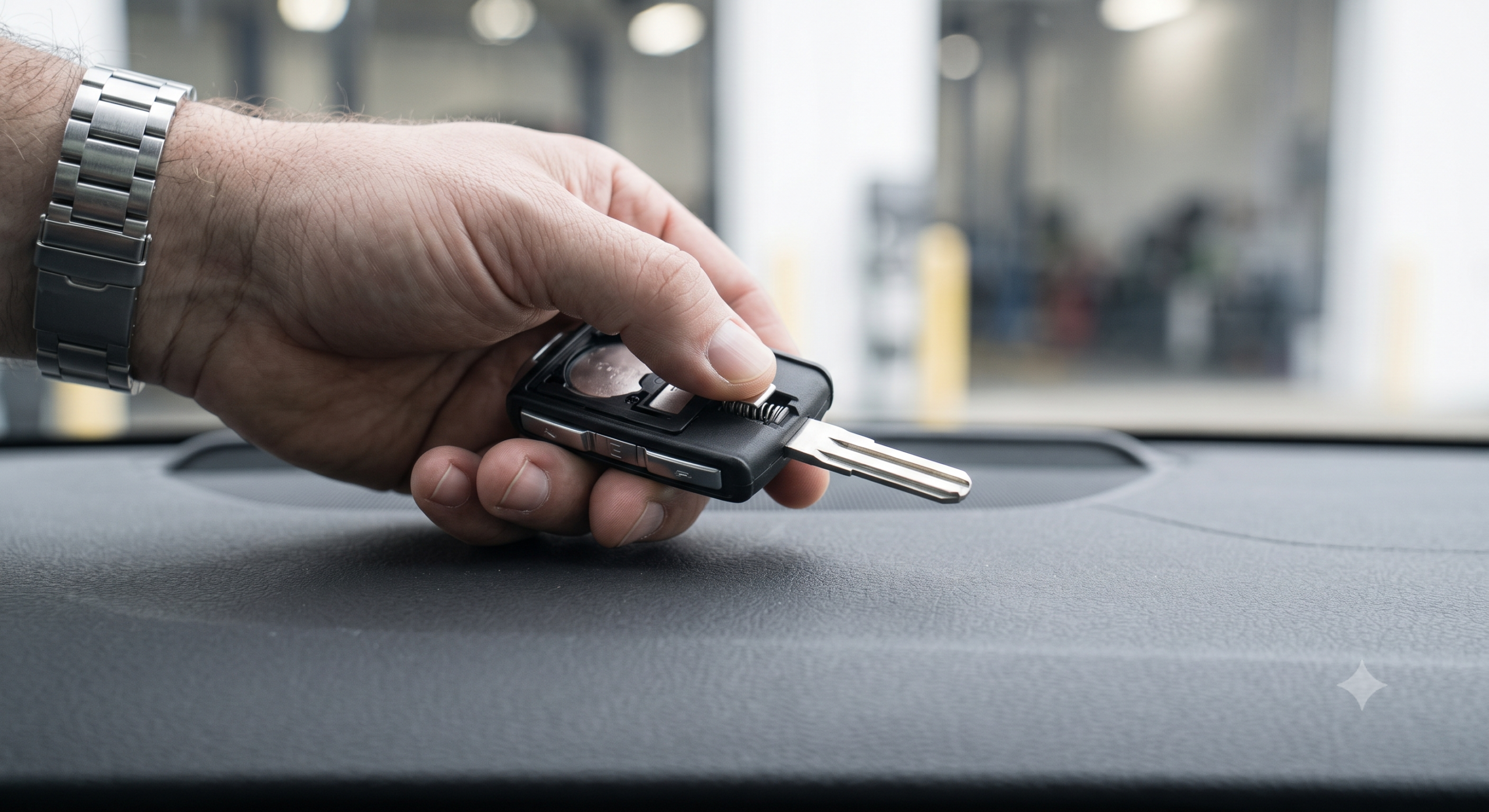
First things first, we need to get you inside your Volvo. Here’s a little secret: your key fob has been hiding a physical key all along! It’s like finding money in your old jacket pocket, but it’s more useful now.
To access this hidden treasure:
- Look for a small button or switch on your key fob.
- Press it, and voila! A small metal key should pop out.
- Now, check the driver’s door handle. You’ll see a tiny keyhole hiding under a removable cover.
- Gently pry off this cover (careful not to scratch your paint!).
- Insert the key and turn it like it’s 1999.
Congratulations! You’re in. But don’t get too comfy yet; we still have an engine to start.
Locating and Using the Backup Start Location
Now that you’re in, it’s time to wake up that sleeping engine. Your Volvo XC60 has a secret spot where it can read your key fob even if the battery’s dead. It’s like a backup plan for your backup plan.
Here’s what to do:
- Look for a small slot or designated area in your center console. It might have a key symbol next to it.
- Take your whole key fob (yes, even though it’s “dead”) and place it in or next to this spot.
- Press the brake pedal.
- Push the start button.
If all goes well, your engine should roar to life. If it doesn’t work immediately, try moving the key fob around. Sometimes, it’s just shy and needs a little coaxing.
Oh, and a word of caution: if you have multiple keys in your car, ensure only the one you want to use is near the reader. Otherwise, your car might get confused and refuse to start. It’s like trying to pick your favorite child – best to avoid the situation altogether!
Alternative Solutions if Your Key Fob is Dead
Sometimes, even our best-laid plans go awry. If the backup start method isn’t working, don’t worry. We’ve got more tricks up our sleeve!
Starting the XC60 with the Volvo On Call App
Welcome to the 21st century, where your smartphone can do almost anything, including starting your car! You’re in luck if you’ve set up the Volvo On Call app.
Here’s how to use this digital wizardry:
- Open the Volvo On Call app on your smartphone.
- Log in (if you haven’t already done so).
- Select your XC60 from the list of vehicles.
- Look for the “Remote Start” or “Unlock” option.
- Follow the prompts to start or unlock your car.
It’s like magic but with more megabytes. Remember, this only works if you’ve previously set up the app and your car is connected to the Volvo On Call service. If you haven’t done this yet, let’s just say it’s a good reminder to do it as soon as you get your car started!
Using a Spare Key Fob
Remember that spare key fob you got when you bought your Volvo? The one you tossed in a drawer and promptly forgot about? Now’s its time to shine!
If you have a spare key fob:
- Get it (this might involve some drawer-diving).
- Use it to unlock and start your car just like you normally would.
- Make a mental note (or set a phone reminder) to replace the battery in your original key fob ASAP.
Having a spare key fob is like having a spare tire – you hope you never need it, but you’re really glad it’s there when you do. If you don’t have a spare, consider getting one. Future you will thank present you!
Calling for Roadside Assistance
If all else fails, it’s time to call in the cavalry. Volvo offers roadside assistance and is equipped to handle key fob emergencies. They can often unlock your car remotely or send someone to help you get back on the road.
Don’t have Volvo’s roadside assistance? No problem! Other services like AAA can also help with lockouts. Just be prepared to prove you own the car – they don’t want to help someone steal your sweet ride accidentally!
Preventative Measures to Avoid Dead Key Fob Issues in the Future
Now that we’ve gotten you out of this pickle, let’s discuss how to avoid finding yourself in this situation again. Because let’s face it, once is enough!
Regular Battery Replacement
Just like changing the oil in your car, replacing your key fob battery should be part of your regular maintenance routine. But how often should you do it?
Most Volvo key fob batteries last about 3-4 years, but this can vary depending on how often you use them. If you start noticing that you must press the button multiple times or stand closer to the car for it to work, it’s probably time for a new battery.
Changing the battery is usually pretty simple:
- Open the key fob (there’s often a small release catch).
- Note how the old battery is positioned.
- Remove the old battery and insert the new one in the same position.
- Close the key fob and test it out.
The battery type is usually CR2032, but double-check your owner’s manual. And hey, while you’re at it, why not change the battery in your spare key fob too? Two birds, one stone!
Protecting the Key Fob from Damage
Your key fob may be small, but it’s a crucial part of your car. Treat it with the respect it deserves! Here are some tips to keep it safe:
- Keep it dry. If it does get wet, dry it thoroughly as soon as possible.
- Avoid extreme temperatures. Don’t leave it in direct sunlight or a freezing car overnight.
- Store it carefully. A designated spot in your home can prevent it from getting lost or damaged.
- Handle with care. Try not to drop it or sit on it (easier said than done, I know!).
Remember, a little TLC for your key fob can save you a lot of headaches.
Troubleshooting Common Key Fob Problems
Sometimes, a dead battery isn’t the only issue your key fob might face. Let’s look at some other common problems and how to solve them.
Diagnosing the Issue with Your Key Fob
Is your key fob acting up, but you’re not sure why? Here are some common symptoms and what they might mean:
- The fob works intermittently: This could be a weak battery or a problem with the internal components.
- The car doesn’t always recognize the fob: This might be due to signal interference or a problem with the car’s receiver.
- Buttons feel sticky or unresponsive: This could be due to physical damage or wear and tear.
If you’re unsure what’s wrong, try using your spare key fob. If it works fine, the problem is likely with the fob itself. If both fobs have issues, the problem might be with your car’s receiver.
Reprogramming the Key Fob
Sometimes, your key fob and car must be reintroduced, like old friends who’ve lost touch. Reprogramming can often solve issues with signal disruption or communication failures.
While the exact process can vary, here’s a general guide:
- Sit in the driver’s seat with all doors closed.
- Insert the key into the ignition (or place it in the backup start location if you have a keyless ignition).
- Turn the key to the “On” position (but don’t start the engine) and back to “Off” quickly.
- Repeat this on-off cycle several times in quick succession.
- If successful, you’ll usually hear a chime or see a dashboard light to confirm the programming.
If this doesn’t work, you might need to visit a Volvo dealer or a locksmith with the right equipment to reprogram the fob.
Frequently Asked Questions About Volvo XC60 Key Fobs
Let’s wrap up with some common questions I often hear about Volvo XC60 key fobs. Consider this your cheat sheet for impressing your friends with your newfound key fob wisdom!
Can I Start My Volvo XC60 Without a Working Key Fob?
Yes, you can! As we discussed earlier, your Volvo XC60 has a backup system that allows you to start the car even if your key fob’s battery is dead. You’ll need to use the hidden mechanical key to unlock the door, then place the dead fob next to the backup reader to start the engine.
In a pinch, you can also use the Volvo On Call app to unlock and start your car remotely, provided you’ve set it up beforehand. It’s like having a spare key in your phone!
How Much Does It Cost to Replace a Volvo Key Fob?
Ah, the million-dollar question (okay, not quite a million, but it can feel like it sometimes). The cost of replacing a Volvo key fob can vary widely depending on a few factors:
- New vs. Used: A brand-new brand-new key fob from a Volvo dealer will be more expensive than a used one.
- Programming: You’ll need to factor in the cost of programming the new fob to work with your car.
- Your Location: Prices can vary depending on where you live and which dealer or locksmith you use.
On average, you’re looking at anywhere from $200 to $500 for a new, programmed key fob. I know – it’s enough to make your wallet cry. But remember, this sophisticated technology is crucial for your car’s security.
Pro tip: Some auto insurance policies cover key fob replacement. It’s worth checking your policy or giving your insurance agent a call.
What Should I Do If My Key Fob Stops Working While I’m Away from Home?
Been there, done that, and let me tell you, it’s not fun. But don’t panic! Here’s what you can do:
- Try the Backup Method: Remember that hidden mechanical key and the backup start location we discussed? Give those a try first.
- Use the Volvo On Call App: This can be a lifesaver if you’ve set it up. You can unlock and even start your car right from your phone.
- Contact Roadside Assistance: Whether it’s Volvo’s service or another provider like AAA, they can often help you get back on the road.
- Call a Local Volvo Dealer: They might be able to courier a new key fob to you or provide other assistance.
- Check for Nearby Locksmiths: Some can program new key fobs on the spot, though this can be pricey.
Remember, always keep the contact info for Volvo roadside assistance handy – you never know when you might need it!
And there you have it – everything you need to know about starting your Volvo XC60 with a dead key fob and then some! Remember, a little preparation goes a long way. Keep your key fob battery fresh, have a spare, and set up that Volvo On Call app. Your future self will thank you when you’re not stuck in a parking lot, late for a meeting, with a car that won’t start. Stay safe, and happy driving!