How to Remote Start a Volvo With a Key Fob?

It’s 15 degrees out, and you’d love to warm up your Volvo from the kitchen window instead of shivering through the first five minutes of your drive. You don’t need to open an app for this — your key fob can already do it, if you know the exact button sequence.
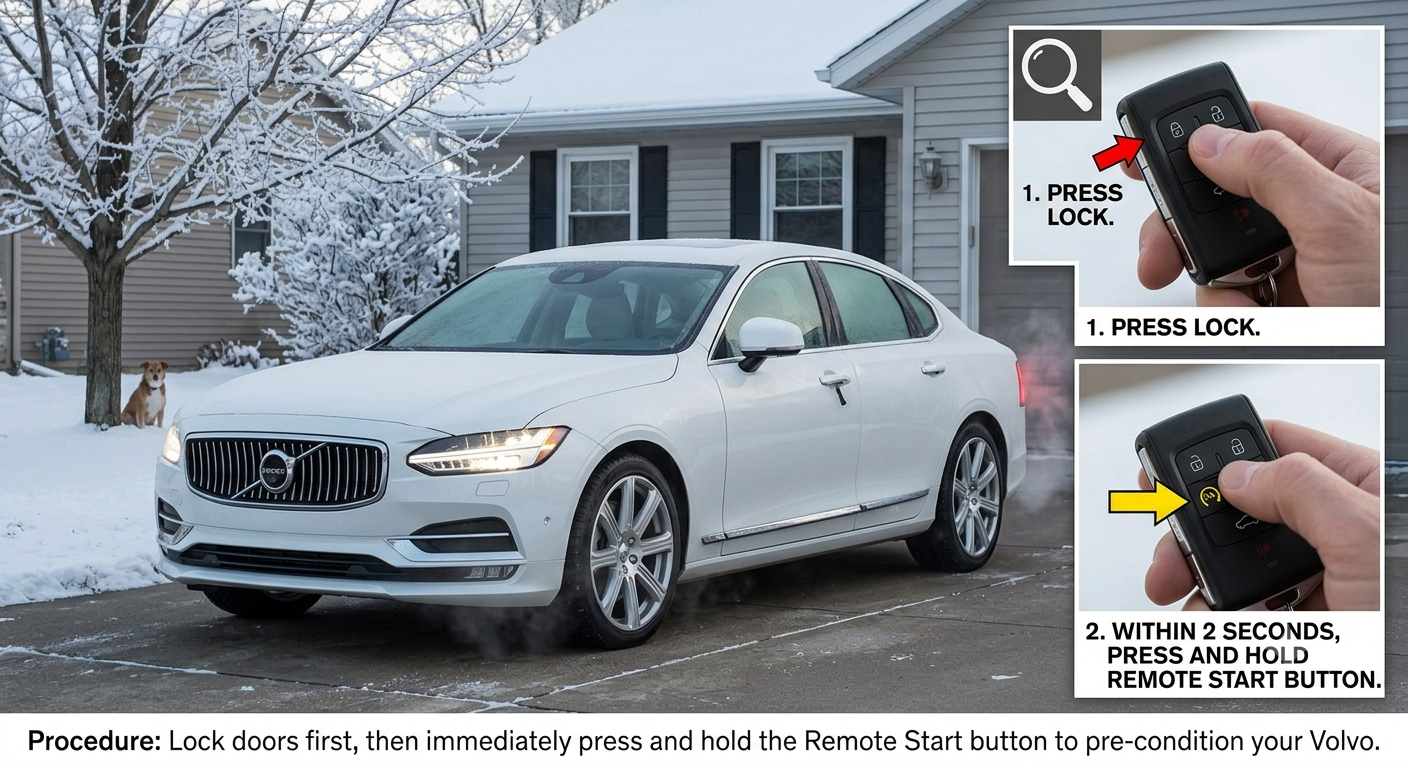
The short answer: to remote start a Volvo with the key fob, briefly press the lock button, then immediately follow with a long press of at least two seconds on the lamp (approach lighting) button. The turn signals will flash rapidly to confirm the engine has started. This works on most Volvos from around model year 2015 onward, provided the car is locked, in Park, and has enough fuel.
This guide is based on Volvo’s own official support documentation and verified dealer service pages, so you’re working from the actual factory procedure rather than a guessed-at button combo.
TL;DR
- The sequence is: briefly press Lock, then immediately hold the lamp/approach-light button for at least 2 seconds.
- The car must be locked, in Park, and have the hood fully closed before remote start will work.
- A successfully started engine runs for up to 15 minutes, and can be re-activated once more before you need to start it normally from inside.
- Opening a door, touching the brake, or moving the shifter immediately shuts the engine back off.
- Standard remote start functions are available via the Volvo Cars app on model year 2015 and later vehicles, as an alternative to the fob.
The Exact Button Sequence
Volvo’s official documentation is specific about the timing here, and getting it slightly wrong is the most common reason this feature seems “broken” when it isn’t. <cite index=”84-1″>The correct sequence is a brief press on the lock button, followed immediately by a long press of at least 2 seconds on the lamp button</cite>.
<cite index=”84-1″>If the conditions for remote start are met, the turn signals flash quickly several times, the engine starts, and then the turn signals illuminate with a steady glow for about 3 seconds to confirm the engine has actually started</cite>. If you only see one quick flash and nothing else, one of the required conditions likely isn’t being met.
Quick Tip: The timing matters more than most people expect. Pressing lock and then waiting too long before pressing the lamp button, or holding the lamp button for less than two full seconds, are the two most common reasons this sequence fails on the first try.
Pull-quote: Lock, then hold the lamp button for two seconds — the whole trick lives in that timing.
What Has to Be True Before Remote Start Will Work
This isn’t a feature you can trigger from just anywhere. <cite index=”84-1″>To remotely start the engine, the car must already be locked and the hood must be fully closed</cite>. <cite index=”79-1″>Remote start will only activate when the car is in Park and all doors are locked</cite>.
Beyond those baseline conditions, real-world troubleshooting reports point to a few other common blockers. <cite index=”78-1″>If remote start doesn’t respond, check that the gas tank has sufficient fuel and that the vehicle isn’t parked in an enclosed, unventilated space</cite>, since Volvo’s system is designed to avoid starting the engine somewhere exhaust could build up dangerously.
Real-world scenario: Picture trying to remote start your Volvo from the office parking garage window, but nothing happens even after a clean button sequence. If the car is parked in a tight, enclosed spot or hasn’t been locked properly since you walked away, either condition alone is enough to block the whole feature — worth checking before assuming something’s actually broken.
How Long It Runs, and What Shuts It Off
Remote start isn’t meant to be a permanent convenience — it’s a bridge to actually driving the car. <cite index=”79-1″>Remote start can be activated up to two times in a row at 15 minutes each time; after the second activation, the car must be restarted normally by inserting the key fob and pressing the start button in the ignition</cite>.
Several everyday actions will end a remote-started session immediately. <cite index=”84-1″>The engine shuts off if the remote control key’s lock, unlock, or panic button is pressed, if the active remote start time exceeds 15 minutes, or if any door is opened, the brakes are touched, or the shifter is moved</cite>. <cite index=”78-1″>If you unlock the vehicle after remote start has been activated, it will automatically stop running as a security measure</cite> — this is intentional, not a glitch, and it’s one of the reasons you should unlock the car only once you’re ready to actually get in and drive.
Expert Insight: Don’t unlock the car “just to grab something” while it’s remote-idling in the driveway on a cold morning. That single action shuts the engine off immediately, and you’ll need to either remote-start it again (using one of your two available activations) or start it normally once inside.
Remote Start at a Glance
| Requirement or Limit | Detail |
|---|---|
| Button sequence | Brief press: Lock → Immediately hold: Lamp/Approach light (2+ sec) |
| Car state required | Locked, in Park, hood closed, adequate fuel |
| Confirmation signal | Rapid turn signal flash, then steady glow for ~3 seconds |
| Maximum run time | 15 minutes per activation |
| Activation limit | 2 consecutive remote starts, then must start normally |
| What ends it early | Unlocking the car, opening a door, touching brake/shifter, pressing lock/unlock/panic |
Pull-quote: Unlocking a remote-started Volvo isn’t just “getting in” — it’s the shutoff switch.
Checking Whether the Engine Actually Started
If you’re not standing close enough to see the turn signals clearly, or you’re second-guessing whether the sequence worked, there’s a built-in way to check. <cite index=”79-1″>On certain key fobs, you can confirm whether remote start has activated by pressing the information button, which illuminates a green light on the lock button and a red light on the approach light button</cite> if the engine is currently running.
This check is worth doing before walking back inside, especially in genuinely cold weather where you want confirmation the cabin is actually warming up rather than assuming it worked based on a flash you may have half-seen from a distance.
Pros and Cons by Situation
The driver remote starting from indoors on a cold morning:
- Pro: The key fob method works without needing your phone, an app, or a cell signal.
- Con: You have to be within roughly 65 feet of the vehicle for the fob’s signal to reach it, which may not cover every driveway or parking situation.
The driver who wants app-based control instead:
- Pro: <cite index=”78-1″>The Volvo Cars app allows remote start along with cabin temperature pre-conditioning</cite>, giving more control than the fob alone.
- Con: The app requires a working data connection and a charged phone, which the physical fob doesn’t need.
The owner of an older Volvo without factory remote start:
- Pro: <cite index=”82-1″>Adding remote start to an older model is possible in some cases through a dealer service department</cite>.
- Con: <cite index=”82-1″>This retrofit process is fairly involved</cite>, and availability depends heavily on the specific model and year.
Frequently Asked Questions
What is the exact button sequence to remote start a Volvo with the key fob? <cite index=”84-1″>Briefly press the lock button, then immediately follow with a long press of at least 2 seconds on the lamp/approach-light button</cite>.
Why won’t my Volvo remote start even though I’m pressing the right buttons? Check that <cite index=”84-1″>the car is locked and the hood is fully closed</cite>, and confirm <cite index=”78-1″>there’s enough fuel and the car isn’t parked in an enclosed, unventilated space</cite> — any one of these can silently block the feature.
How long does a Volvo stay running after a remote start? <cite index=”79-1″>Up to 15 minutes per activation, and it can be activated twice in a row before you need to start the car normally from inside</cite>.
Why did my Volvo’s engine shut off right after I unlocked it? <cite index=”78-1″>This is intentional — unlocking the vehicle after remote start automatically stops the engine as a security measure</cite>, not a malfunction.
Do all Volvo models support key fob remote start? <cite index=”78-1″>Remote start is generally available on Volvo model years 2015 and later</cite>, and is standard on current models like the XC90 and XC60, accessible via either the key fob or the Volvo Cars app.
Key Takeaways
- The remote start sequence is brief Lock press, then hold Lamp/Approach-light for 2+ seconds.
- The car must be locked, parked, and have its hood closed for the feature to activate at all.
- Each activation lasts up to 15 minutes, with a maximum of two consecutive activations.
- Unlocking the car immediately shuts the engine off — this is a built-in safety measure, not a bug.
- The Volvo Cars app offers the same core function with added temperature pre-conditioning, as an alternative to the fob.
Use the key fob method if you want a fast, app-free way to start the car from short range. Use the Volvo Cars app instead if you want to also adjust cabin temperature or you’re farther away than the fob’s signal range allows.
Next Step
Practice the lock-then-lamp sequence once on a day you don’t actually need remote start, so the timing is second nature the first genuinely cold morning you rely on it.