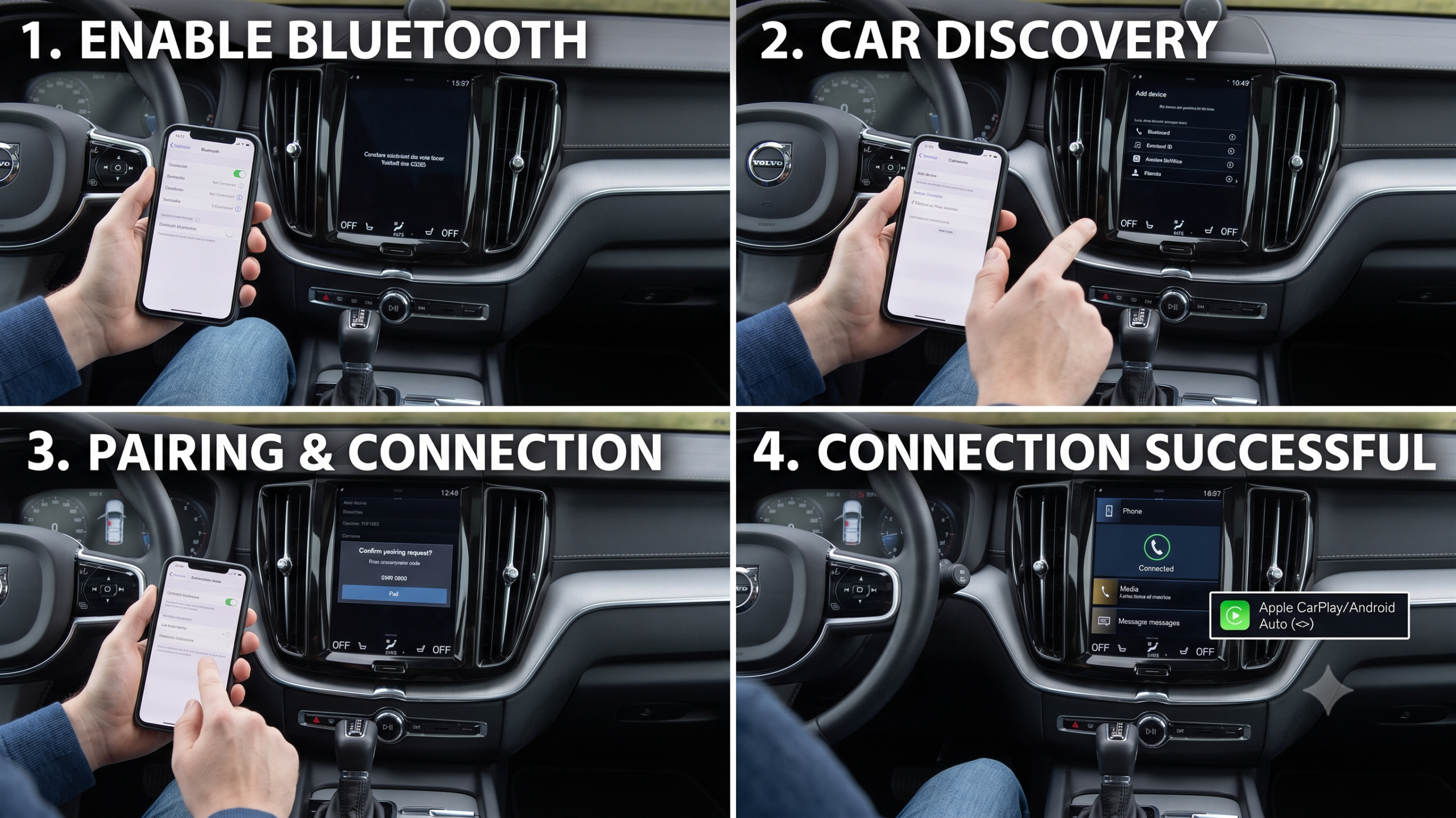
How to Connect Your Phone to a Volvo XC60?

New XC60, new phone, and the touchscreen is asking questions you don’t have answers to yet. Here’s the good news: connecting your phone takes under a minute for basic Bluetooth, and only a little longer for Apple CarPlay. The confusing part is that which options you actually have depends on which infotainment system your specific XC60 runs — and that’s exactly where most generic guides get it wrong.
TL;DR
- Bluetooth pairing works the same way across every XC60 generation: Phone menu → Add Phone → Make Vehicle Discoverable → confirm the PIN.
- Apple CarPlay is standard on every current XC60, but on most model years it requires a wired USB connection, not wireless.
- <cite index=”53-1″>CarPlay and Bluetooth can’t run at the same time — turning on CarPlay automatically disables Bluetooth phone/media connections.</cite>
- Android Auto is only available on older Sensus-equipped XC60s (roughly 2017–2021). Newer XC60s built on Volvo’s Google built-in system don’t offer Android Auto because Google apps are already built directly into the car.
- Only the EX90, EX30, and 2025 XC40 currently offer wireless CarPlay from the factory — every current XC60 still needs the cable.
How to Pair Your Phone via Bluetooth
This is the fastest option and works identically whether your XC60 has the older Sensus system or the newer Google built-in display.
- Turn on Bluetooth on your phone.
- <cite index=”51-1″>On the Volvo touchscreen, go to “Phone,” then select “Add Phone,” then “Make Vehicle Discoverable.”</cite>
- <cite index=”51-1″>On your phone’s Bluetooth menu, select “My Volvo Car” from the list of nearby devices.</cite>
- <cite index=”51-1″>Confirm that the PIN shown on the Volvo touchscreen matches the one on your phone, then press “Confirm.”</cite>
- <cite index=”51-1″>Choose which features you want enabled — calls, media, or both — then press “Finish.”</cite>
Quick Tip: If your phone doesn’t show up in step 3, double-check that the car is actually in “discoverable” mode and that you’re not still inside an active CarPlay session — the two can’t run simultaneously.
How to Set Up Apple CarPlay on a Volvo XC60
<cite index=”55-1″>Every current Volvo model, including the XC60, supports CarPlay.</cite> On the vast majority of XC60 model years, though, that means plugging in — wireless CarPlay hasn’t reached the XC60 yet.
- On your iPhone, confirm CarPlay is enabled: Settings > General > CarPlay.
- Confirm Siri is turned on: Settings > Siri & Search — <cite index=”53-1″>Siri must be active for CarPlay to work in the vehicle.</cite>
- <cite index=”58-1″>Connect your iPhone to the vehicle’s USB port — the one with a white highlight — using a USB-C to Lightning cable (or USB-C to USB-C on newer iPhones).</cite>
- <cite index=”53-1″>The first time you connect, read and accept the connection terms shown on the center display.</cite> <cite index=”58-1″>After that first setup, CarPlay will start automatically every time you plug in.</cite>
- Your iPhone’s compatible apps now appear on the Volvo’s touchscreen.
Expert Insight: <cite index=”53-1″>CarPlay can only be used while Bluetooth is turned off in the car — a phone or media player connected via Bluetooth won’t be available while CarPlay is active.</cite> If you want both hands-free calling through Bluetooth and CarPlay for navigation, you’ll need to toggle between them rather than run both at once.
Does the Volvo XC60 Have Android Auto?
This is where a lot of online guides get it wrong by treating every XC60 the same. The honest answer depends entirely on which infotainment generation your car has.
If your XC60 has the classic Sensus system (roughly 2017–2021 model years): <cite index=”52-1″>yes — download the Android Auto app from Google Play, connect your Android device to the Volvo’s USB port with a manufacturer-approved cable, and press OK when prompted on the Sensus Connect screen.</cite>
If your XC60 has Volvo’s newer Google built-in system: there’s no separate Android Auto app to install, because <cite index=”59-1″>Volvo has adopted an Android-based operating system with a Google Play Store built directly in, letting you download apps like Spotify and Maps natively rather than mirroring them from your phone.</cite> <cite index=”59-1″>You can still pair your phone over Bluetooth for calls, but the mirroring functions Android Auto normally provides are already built into the car itself.</cite>
Pull-quote: “Newer XC60s don’t lack Android Auto by accident — Google is already built into the car, so there’s nothing left to mirror.”
Comparison: Connection Method by Feature
| Method | Works On | Wireless? | Requires Bluetooth Off? |
|---|---|---|---|
| Bluetooth (calls/media) | All XC60 generations | Yes | No — this is Bluetooth |
| Apple CarPlay | All current XC60s | No (wired only) | Yes, while active |
| Android Auto | Sensus-era XC60s only (~2017–2021) | No (wired only) | No, runs alongside |
| Google built-in apps | Newer Google-based XC60s | N/A — native to car | No |
What If Your Phone Won’t Connect?
A few quick checks resolve most connection failures before you need to dig deeper:
- Update your phone’s software. <cite index=”58-1″>Keeping your iPhone and its apps updated to the latest versions helps CarPlay connect reliably.</cite>
- Check the cable itself. A non-certified or damaged USB cable is a common, easy-to-overlook cause of a CarPlay connection that won’t start.
- Confirm you’re using the correct USB port. <cite index=”53-1″>CarPlay specifically requires the USB port marked with a white frame — plugging into a different port for charging won’t trigger CarPlay.</cite>
- Forget and re-pair the Bluetooth connection if calls or media stop working after a software update on either the phone or the car.
Pros and Cons by Owner Type
The iPhone Owner
- ✅ CarPlay comes standard and setup takes under a minute after the first connection.
- ❌ Without a cable in the car, you’re stuck with Bluetooth-only functionality on most current XC60s.
The Android Owner With a Newer XC60
- ✅ Built-in Google apps mean no phone mirroring lag and full-screen native navigation and music apps.
- ❌ If you’re used to Android Auto’s exact interface from another car, the built-in Google layout will feel different at first.
The Android Owner With an Older Sensus XC60
- ✅ Standard Android Auto works exactly as expected, with familiar Google Maps and Assistant integration.
- ❌ Still wired-only — no wireless Android Auto on this generation.
Frequently Asked Questions
Can I use Apple CarPlay wirelessly on a Volvo XC60? <cite index=”55-1″>Not on the current XC60 — only the EX90, EX30, and 2025 XC40 currently offer wireless CarPlay from the factory; every other current Volvo, including the XC60, requires a wired connection.</cite>
Why doesn’t my new XC60 have an Android Auto app? Newer XC60s use Volvo’s Google built-in system, which <cite index=”59-1″>has Google apps and the Play Store built directly into the car, making a separate Android Auto mirroring app unnecessary.</cite>
Can I use Bluetooth and Apple CarPlay at the same time? No. <cite index=”53-1″>CarPlay requires Bluetooth to be turned off in the vehicle, so the two can’t run simultaneously.</cite>
What cable do I need for Apple CarPlay in an XC60? <cite index=”58-1″>A USB-C to Lightning cable connected to the vehicle’s white-highlighted USB port, or USB-C to USB-C for newer iPhone models.</cite>
Does an older Volvo XC60 (pre-2017) support any of this? Older Sensus-based models generally support Bluetooth pairing, and CarPlay support was extended to many pre-2017 XC60s via software updates — check with a Volvo retailer to confirm your specific model year and whether an update or dealer-installed module is needed.
Key Takeaways
- Bluetooth pairing works the same across every XC60 generation and is the fastest option to set up.
- Apple CarPlay is standard on every current XC60 but requires a wired connection on this model.
- CarPlay and Bluetooth can’t run at the same time — activating one disables the other.
- Android Auto only exists on Sensus-era XC60s; newer Google built-in models replace it with native apps instead.
- A bad cable or the wrong USB port causes more “broken CarPlay” complaints than any actual system fault.
Ready to Connect?
Grab the right cable for your phone type, plug into the white-highlighted USB port, and follow the on-screen prompts — most owners are up and running in well under two minutes.
Volatile data flagged:
- Wireless CarPlay availability (currently limited to EX90, EX30, 2025 XC40) is a fast-moving spec that Volvo is actively expanding across the lineup — confirm this list is still current against Volvo Support before publishing, since it could change within months of this article going live.
- The exact model-year cutoff between Sensus-era and Google built-in XC60 (used here as “~2017–2021” vs. newer) is inferred from cross-referenced dealer sources rather than a single definitive Volvo statement — recommend confirming the precise XC60 model year of the infotainment transition against Volvo’s official specs before publishing, since sources varied slightly on exact timing.
- Pre-2017 XC60 CarPlay retrofit availability is mentioned generally per a third-party source (Car Tech Studio) — this is aftermarket/software-update territory that varies by dealer and region, so treat as a pointer to “check with a retailer” rather than a firm claim.
Series anchor confirmation: No conflicts with existing XC60/XC40/EX-series anchors — this article is infotainment/connectivity content and doesn’t touch assembly, tax credit, or naming facts.