How to Fold Mirrors on a Volvo XC60?

Squeezing into a narrow garage, a drive-thru lane, or a tight parking spot, and suddenly those side mirrors feel three inches too wide? The Volvo XC60 folds them in two ways — a manual button press, or an automatic setting tied to locking the car — and knowing both means you’re never stuck guessing at the door panel in the dark.
TL;DR
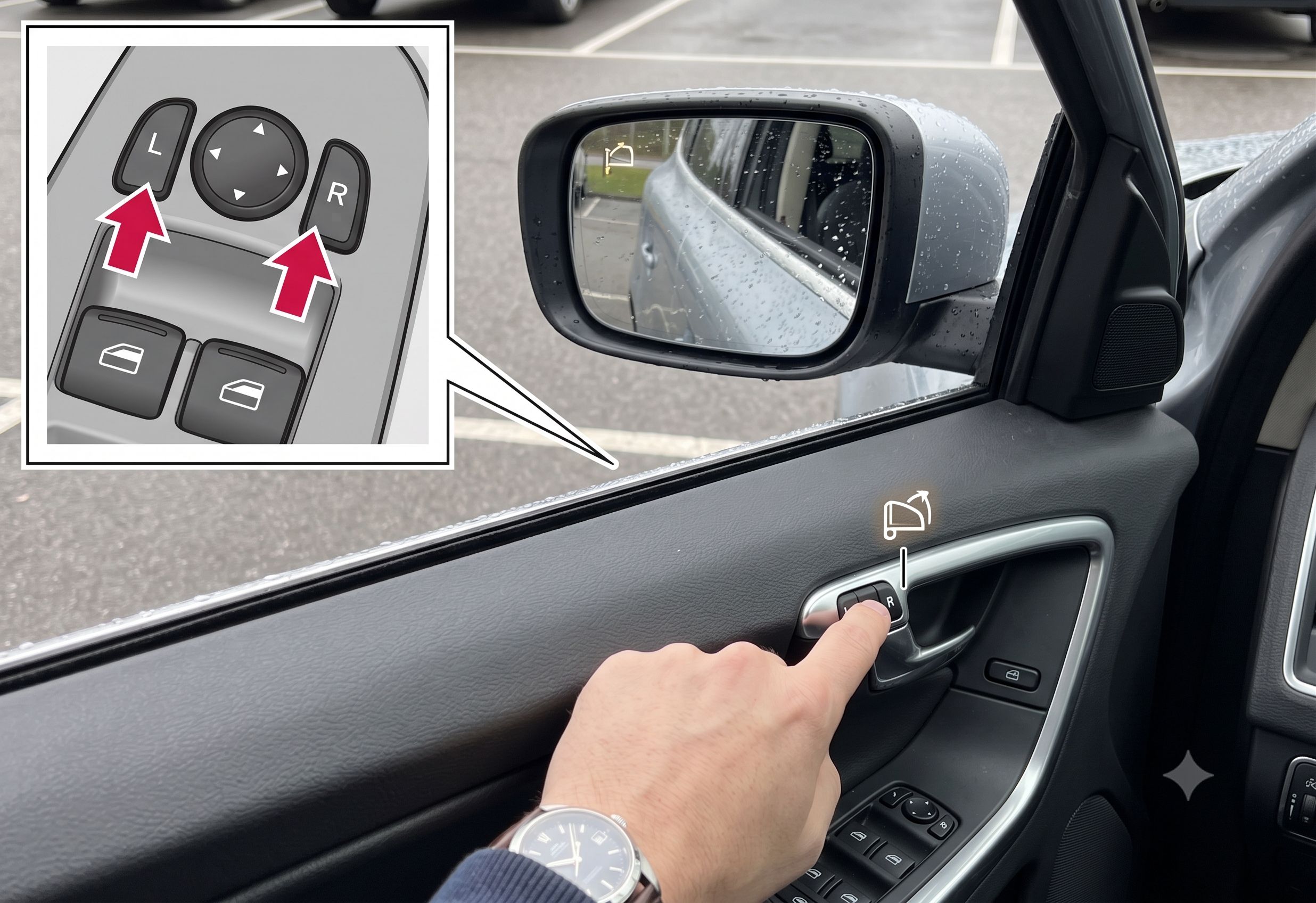
- Manual fold: <cite index=”65-1″>press and hold the L and R buttons on the driver’s door panel at the same time briefly, and the mirrors fold in; press them again the same way to unfold.</cite>
- Auto-fold on locking: <cite index=”65-1″>turn this on or off through the center display under locking settings — look for “Auto fold mirrors.”</cite>
- Important quirk: <cite index=”65-1″>if you manually fold the mirrors and then lock the car, they won’t automatically unfold when you unlock it, even with auto-fold enabled.</cite>
- Frozen or manually displaced mirrors need an electric reset — fold and unfold them electrically a couple of times to restore normal function.
- Some XC60s also tilt the mirrors down in reverse to help you see the curb — a separate, adjustable setting.
How to Manually Fold the Mirrors
This is the fastest method and works the same whether the car is running or not.
- Locate the L and R buttons on the driver’s door button panel — usually near the window switches.
- <cite index=”65-1″>Press and hold both buttons at the same time for a short moment.</cite>
- The mirrors fold inward and stop automatically once fully retracted.
- To unfold, repeat the same press — <cite index=”65-1″>the mirrors return to the position they were in before folding.</cite>
Quick Tip: This manual button combo is the move for car washes, narrow garages, or squeezing past a bollard — <cite index=”68-1″>plenty of owners use it specifically for automatic car washes since it avoids relying on the lock-triggered auto-fold.</cite>
How to Set Up Auto-Fold When Locking
If you’d rather not think about it every time, the XC60 can fold the mirrors automatically whenever you lock the car.
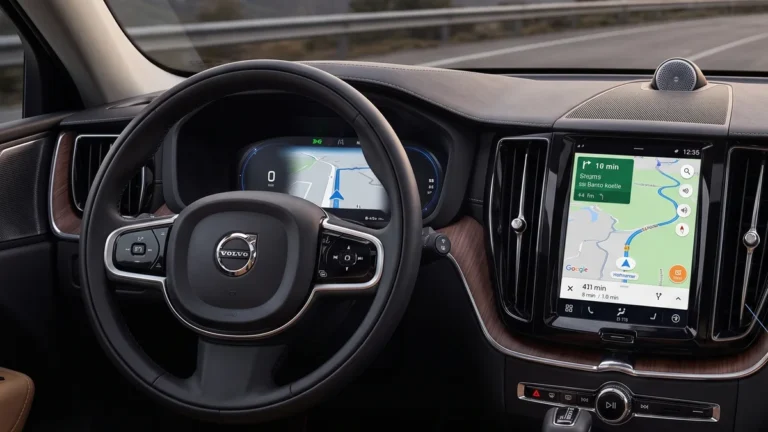
- Open the center display settings menu.
- <cite index=”62-1″>Navigate to “Car Settings” and then “Locks & Mirrors” (or simply “Locking,” depending on model year).</cite>
- Toggle “Auto fold mirrors” on.
- Lock the car as normal — the mirrors should now fold automatically, and unfold again when you unlock.
Pull-quote: “One owner turns on auto-fold for a surprisingly practical reason: it’s a visible, unmistakable signal the car actually locked.”
Expert Insight: This setting does more than save mirrors from scrapes. <cite index=”64-1″>Some owners specifically enable it because it gives a clear visual confirmation that the car actually locked — useful on models where the door locks don’t make an audible clunk.</cite>
The Quirk That Trips Up a Lot of Owners
Here’s the detail that generates the most confused forum posts: manually folding the mirrors overrides the auto-fold setting for that cycle. <cite index=”65-1″>If you enable automatic folding but then fold the mirrors yourself using the buttons and lock the vehicle, the mirrors will not automatically unfold when you unlock it.</cite> You’ll need to press the L and R buttons again to bring them back out manually.
This isn’t a malfunction — it’s the system correctly interpreting your manual action as an override. Once you know it’s expected behavior, it stops being confusing.
What If the Mirrors Stop Folding Correctly?
If a mirror gets knocked out of position — by ice, a stray branch, or an accidental bump — it may stop responding to the fold buttons normally. <cite index=”69-1″>Mirrors that are moved from their position due to outside influence, such as being frozen in the folded position and then manually forced out, need to be electrically reset before automatic folding will work correctly again.</cite>
How to reset a misaligned mirror:
- <cite index=”69-1″>Fold in the mirrors by pressing the L and R buttons at the same time.</cite>
- <cite index=”69-1″>Open them again by pressing the L and R buttons at the same time.</cite>
- <cite index=”69-1″>Repeat this fold/unfold cycle as needed until the mirrors return to their correct neutral position and electric folding functions normally.</cite>
Quick Tip: Cold weather is a common culprit behind mirrors that suddenly “forget” how to fold. If a hard freeze catches the mirrors mid-cycle, a quick blast of the defroster before attempting the reset sequence above often clears up ice interference in the mechanism.
Bonus Feature: Mirrors That Tilt Down in Reverse
Separate from folding entirely, many XC60s can tilt the mirrors downward automatically when you shift into reverse, giving a better view of the curb while parking.
- <cite index=”69-1″>Select reverse gear and press the L or R mirror button — note that the button may need to be pressed twice depending on your settings.</cite>
- <cite index=”69-1″>The button light flashes while the mirror is tilted down.</cite>
- <cite index=”69-1″>When you take the car out of reverse, the mirrors automatically return to their original position.</cite>
- To adjust or disable this behavior, <cite index=”69-1″>tap the center display, go to Controls, and choose your preferred setting under “Exterior mirrors tilt at reverse.”</cite>
Comparison: Fold Methods at a Glance
| Method | How to Trigger | Best For | Auto-Unfolds Later? |
|---|---|---|---|
| Manual button fold | Press L + R together | Car washes, tight garages, quick access | No — press again manually |
| Auto-fold on locking | Toggle in center display settings | Daily parking, visible lock confirmation | Yes, when unlocking normally |
| Reverse tilt-down | Automatic in reverse gear (or button press) | Curb visibility while parking | Returns automatically when out of reverse |
Pros and Cons by Owner Type
The Tight-Garage or Narrow-Street Driver
- ✅ The manual L+R button combo gives instant control without touching any settings menu.
- ❌ It’s easy to forget you folded them manually, which then blocks the next auto-unfold.
The “Did I Lock It?” Household
- ✅ Auto-fold on locking doubles as a visual confirmation the car is actually secured.
- ❌ Frequent folding cycles add wear to the mechanism over years of daily use.
The Cold-Climate Owner
- ✅ Knowing the reset sequence means a frozen mirror is a two-minute fix, not a dealer visit.
- ❌ Ice interference is a recurring seasonal annoyance that manual folding alone won’t prevent.
Frequently Asked Questions
How do I manually fold the mirrors on my Volvo XC60? <cite index=”65-1″>Press and hold the L and R buttons on the driver’s door panel at the same time briefly — the mirrors fold in automatically and stop when fully retracted.</cite>
Why won’t my XC60’s mirrors unfold automatically anymore? <cite index=”65-1″>If you folded them manually before locking the car, the automatic unfold won’t trigger even with the setting enabled — you’ll need to press the buttons again to bring them out.</cite>
Where do I turn on auto-fold mirrors on the XC60? Through the center display’s locking or “Locks & Mirrors” settings menu — look for a toggle labeled “Auto fold mirrors.”
My mirror froze and won’t fold correctly anymore — what do I do? <cite index=”69-1″>Perform an electric reset by folding and unfolding the mirrors with the L and R buttons repeatedly until they return to their correct neutral position.</cite>
Can the XC60’s mirrors tilt down automatically when parking? Yes — <cite index=”69-1″>many XC60s tilt the mirrors down when reverse gear is engaged, and this behavior can be adjusted through the Controls menu on the center display.</cite>
Key Takeaways
- Manual folding uses the L and R buttons together on the driver’s door panel.
- Auto-fold on locking is a toggle in the center display’s locking settings.
- Manually folding before locking overrides auto-unfold — you’ll need to unfold manually afterward too.
- A frozen or displaced mirror needs an electric fold/unfold reset cycle to work correctly again.
- Reverse tilt-down is a separate, adjustable feature from mirror folding.
Ready to Try It?
Test the L and R button combo next time you’re parked, then decide whether auto-fold on locking fits your daily routine — most owners land on a strong preference within the first week.
Volatile data flagged:
- The exact settings-menu path (“Car Settings > Locks & Mirrors” vs. simply “Locking”) varies slightly by model year and infotainment generation per cross-referenced sources — this draft uses the more detailed JustAnswer-sourced path but flags that Volvo’s own official Support article uses simpler “locking in the control settings” phrasing; confirm exact menu wording against the current model year before publishing.
- The reverse tilt-down feature and its double-press requirement is sourced from the XC60 Recharge (plug-in hybrid) support article specifically — worth confirming this applies identically to non-Recharge XC60 trims before presenting it as universal.
Series anchor confirmation: No conflicts with existing XC60/XC40/EX-series anchors — this article is feature/settings content and doesn’t touch assembly, tax credit, or naming facts.