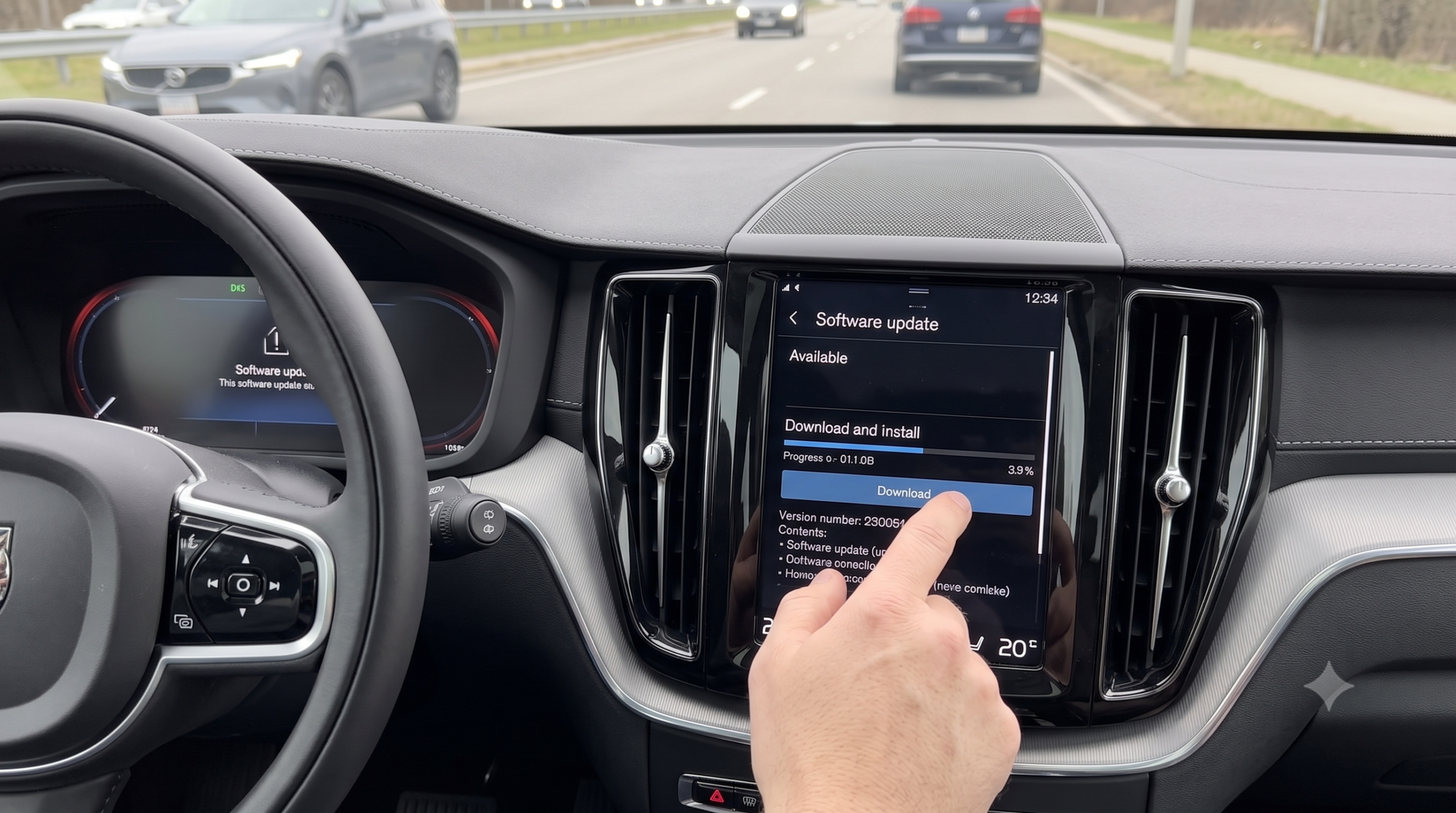
How to Update Software in a Volvo XC60?

You’ve heard your XC60 can update itself like a phone, so you try connecting it to your home Wi-Fi to speed things up — and nothing happens. That’s not a glitch. Volvo’s software updates deliberately don’t work over your Wi-Fi or personal hotspot, and knowing that one detail up front saves a lot of confused troubleshooting.
TL;DR
- Software updates download over-the-air (OTA) using the car’s own built-in SIM card — personal Wi-Fi or a phone hotspot is not currently supported for downloading.
- The process has two separate steps: download (can happen while you drive) and install (requires the car parked and locked).
- Installation can take up to 90 minutes, during which the car is completely locked and inaccessible — plan to do it overnight.
- Older Sensus-based XC60s (roughly pre-2022) generally don’t support full vehicle software OTA updates — only Google Android Automotive-based systems do; Sensus-era mechanical/system updates typically require a dealer visit with Volvo’s VIDA tool.
- You can enable Automatic software download in Settings so updates queue up without you having to check manually.
The Quick Answer
To update software on a Volvo XC60, check the center display for a download notification (or navigate to Settings > System > Software Update), let the car download the update using its own built-in cellular connection, then tap “Install now” when parked, exit, and lock the vehicle — installation runs on its own and can take up to 90 minutes. Whether your specific XC60 supports this fully depends on which infotainment generation it has: newer Google-based systems handle most updates OTA, while older Sensus-based models often still need a dealer visit for deeper system updates.
Step 1: Understand How Volvo’s OTA System Actually Works
It Uses the Car’s Own SIM — Not Your Wi-Fi
This is the detail most guides get wrong or skip entirely. Volvo’s official documentation is explicit: an internet connection provided by the vehicle’s built-in SIM card is required to download software updates, and downloading via a personal SIM or Wi-Fi is not currently supported. If you’re trying to speed up a download by connecting your XC60 to your home network, that effort isn’t doing what you’d expect for the core vehicle software.
Quick Tip: Wi-Fi in the car is still useful for other things — like streaming or a hotspot for passengers — just not for pulling down the vehicle’s own software updates. Don’t troubleshoot a stalled update by chasing your Wi-Fi signal; the update relies on cellular connectivity built into the car itself.
Download and Install Are Two Separate Steps
Software updates happen in two phases. The download can happen in the background — including while you’re driving — and doesn’t require you to do anything once it starts. Once downloaded, you’ll get a notification in the center display and the Volvo Cars app with instructions on how to proceed with installation, which is the step that actually requires the car parked, locked, and left alone.
Step 2: Check for and Download Available Updates
- From the center display, go to Settings > System > Software Update.
- If an update is available for your specific vehicle configuration, you’ll see a notification — not every update applies to every car, since Volvo tailors releases to each vehicle’s configuration.
- Optionally, enable Automatic software download in that same menu so future updates queue up without manual checking.
- You can also check via the Volvo Cars app, under the car tab, in the Car Software or Software Update section.
Expert Insight: If you dismiss a download notification to deal with later, it isn’t gone — swipe down from the top of the center display to find it again, or check the Software Update menu directly. You won’t lose the update by not acting on it immediately.
Step 3: Install the Update
Once downloaded, tap “Install now” on the center display, then exit the vehicle and lock it — the installation process requires the car to be completely inaccessible while it runs.
Quick Tip: Schedule the installation overnight. It can take up to 90 minutes, and accessing the vehicle during installation risks interrupting the process, which can cause real problems with the car’s functions afterward. A driveway overnight install is the lowest-stress option.
Real-world scenario: An owner starts an installation before a quick errand, planning to “just grab something from the trunk” partway through. Doing so interrupts the install and leaves the car in a degraded state until a Volvo retailer resolves it. The lockout isn’t overly cautious — it’s there because accessing the car mid-install genuinely can corrupt the process.
Special Conditions for Electrified Models
- Fully electric vehicles need at least 40% high-voltage battery charge before installation will proceed.
- Plug-in hybrids can’t install while actively charging — unless the vehicle is fully charged with the cable still connected, in which case installation can proceed normally.
Step 4: Confirm It Worked
You’ll get a completion notification in both the center display and the Volvo Cars app. Your vehicle may briefly show as “offline” in the app right after — that’s expected, and it reconnects the next time you drive. You can check your currently installed software version directly in the center display if you want to confirm the update actually applied.
Which Updates Need a Dealer Visit Instead
Not every update is OTA-eligible. Volvo’s documentation notes that certain software releases can only be installed by workshops, and you’ll be notified if that applies to your vehicle. This is especially true for older Sensus-based XC60s, which generally don’t support the broader vehicle software OTA updates that newer Google Android Automotive-based systems handle — deeper mechanical or drivetrain-related software updates on those older systems typically require Volvo’s VIDA diagnostic tool at a dealer, sometimes for a fee.
Expert Insight: If your center display shows “no updates needed” but you suspect deeper system software (engine, transmission, chassis) hasn’t been touched in a while, that’s worth asking your dealer about directly rather than assuming the car’s self-report is the full picture — especially on Sensus-generation vehicles where OTA coverage is more limited.
Comparison Table: OTA vs. Dealer-Installed Updates
| Factor | OTA (Over-the-Air) | Dealer-Installed (VIDA) |
|---|---|---|
| Connection required | Vehicle’s built-in SIM | N/A — done at the shop |
| Typical scope | Infotainment, app, minor feature updates | Drivetrain, ECU, deeper mechanical software |
| Cost | Free | May incur a fee, sometimes covered under warranty |
| Time | Up to 90 minutes, car locked and inaccessible | Hours, vehicle left at dealership |
| Availability | Primarily Google Android Automotive-based systems | All systems, especially older Sensus-based models |
Pros and Cons by Owner Type
The Set-It-and-Forget-It Owner
- ✅ Enabling Automatic software download means updates arrive without any manual checking.
- ❌ You still need to remember to actually tap “Install now” and leave the car alone overnight when a download completes.
The Sensus-Generation Owner (Pre-Google Systems)
- ✅ Map and infotainment updates are often still doable via USB or limited OTA.
- ❌ Deeper mechanical/system software updates likely require a dealer visit and VIDA — don’t expect full self-service OTA coverage.
The Owner Who Hates Dealer Trips
- ✅ Most day-to-day software updates on newer systems genuinely never require a workshop visit.
- ❌ Certain releases are explicitly workshop-only regardless of your system generation — the car will tell you when that applies.
FAQ
Q: Can I update my Volvo XC60’s software using my home Wi-Fi? A: No — downloading updates via personal Wi-Fi or a personal SIM is not currently supported. Updates download through the vehicle’s own built-in cellular SIM.
Q: How long does a software installation take? A: Up to 90 minutes, during which the vehicle must remain locked and inaccessible. Volvo recommends scheduling it overnight.
Q: Does every XC60 support full over-the-air software updates? A: Not entirely. Newer Google Android Automotive-based systems handle most updates OTA; older Sensus-based systems generally need a dealer visit with Volvo’s VIDA tool for deeper software updates.
Q: Will a software update affect my car’s warranty? A: No — Volvo issues and encourages these updates as standard maintenance of the vehicle’s software, not something that impacts warranty coverage.
Q: What happens if I open the car during installation? A: It risks interrupting or terminating the process, which can cause problems with the vehicle’s functions afterward. Avoid accessing the vehicle at all until you get the completion notification.
Key Takeaways
- OTA updates use the car’s own built-in SIM, not your Wi-Fi or personal hotspot.
- The process has two phases — background download, then a locked, hands-off installation that can take up to 90 minutes.
- Older Sensus-based XC60s generally have more limited OTA coverage than newer Google-based systems, and may need a dealer visit for deeper updates.
- EVs need 40%+ battery; PHEVs can’t install while actively charging unless fully charged with the cable still connected.
- Enabling Automatic software download keeps updates queued up without manual checking.
Next Step
Check Settings > System > Software Update tonight to see if anything’s already waiting, and if so, plan the install for overnight so the 90-minute lockout doesn’t interrupt your day.