How To Reset Volvo XC70 Service Light?

Your Volvo XC70 just told you “TIME FOR REGULAR SERVICE,” and now that little wrench icon won’t leave you alone. Here’s the good news: you almost never need a dealer visit or a diagnostic tool to clear it — you can do it yourself in about 30 seconds with just your key (or start button).
TL;DR
- The reset uses your trip odometer button, not a hidden menu or scan tool.
- The exact sequence depends on whether your XC70 has a traditional key ignition (2001–2007) or a push-button start (2008–2016).
- You’re watching for the orange/yellow warning symbol to flash, then you release the button.
- If it doesn’t work, you may have caught the timing wrong — this is the #1 reason people think it’s “broken.”
- A persistent light after reset often means an actual mechanical issue, not a software glitch.
The Quick Answer
To reset the service light on a Volvo XC70, turn the ignition to position I, press and hold the trip odometer reset button, then turn the key to position II (or press the start button on 2008+ models) while still holding the button. Keep holding until the warning light flashes, then release. No tools required.
Why Trust This Guide
Volvo’s Service Reminder Indicator (SRI) system has stayed mechanically similar across two full XC70 generations, and the reset trick has been independently verified by thousands of owners on Volvo enthusiast forums over more than a decade — it’s not a rumor, it’s a documented factory procedure.
Pull quote: The service light isn’t smart — it’s just a mileage counter, and you’re allowed to reset it yourself.
Which XC70 Generation Do You Have?
This matters more than anything else in this guide, because Volvo changed the ignition hardware partway through the XC70’s life.
| Generation | Model Years | Ignition Type | Reset Method |
|---|---|---|---|
| P2 (first-gen XC70) | 2001–2007 | Traditional key, positions I/II | Key + trip button |
| P3 (second-gen XC70) | 2008–2016 | Push-button start | Start button + trip button |
Quick Tip: Not sure which generation you have? If you insert and turn a physical key, you’re on P2. If you push a button to start (even with a key fob nearby), you’re on P3.
How to Reset the Service Light — 2001–2007 XC70 (Key Ignition)
This generation uses your physical key and the classic trip odometer trick.
- Put the key in the ignition and turn to position I (accessory, not running).
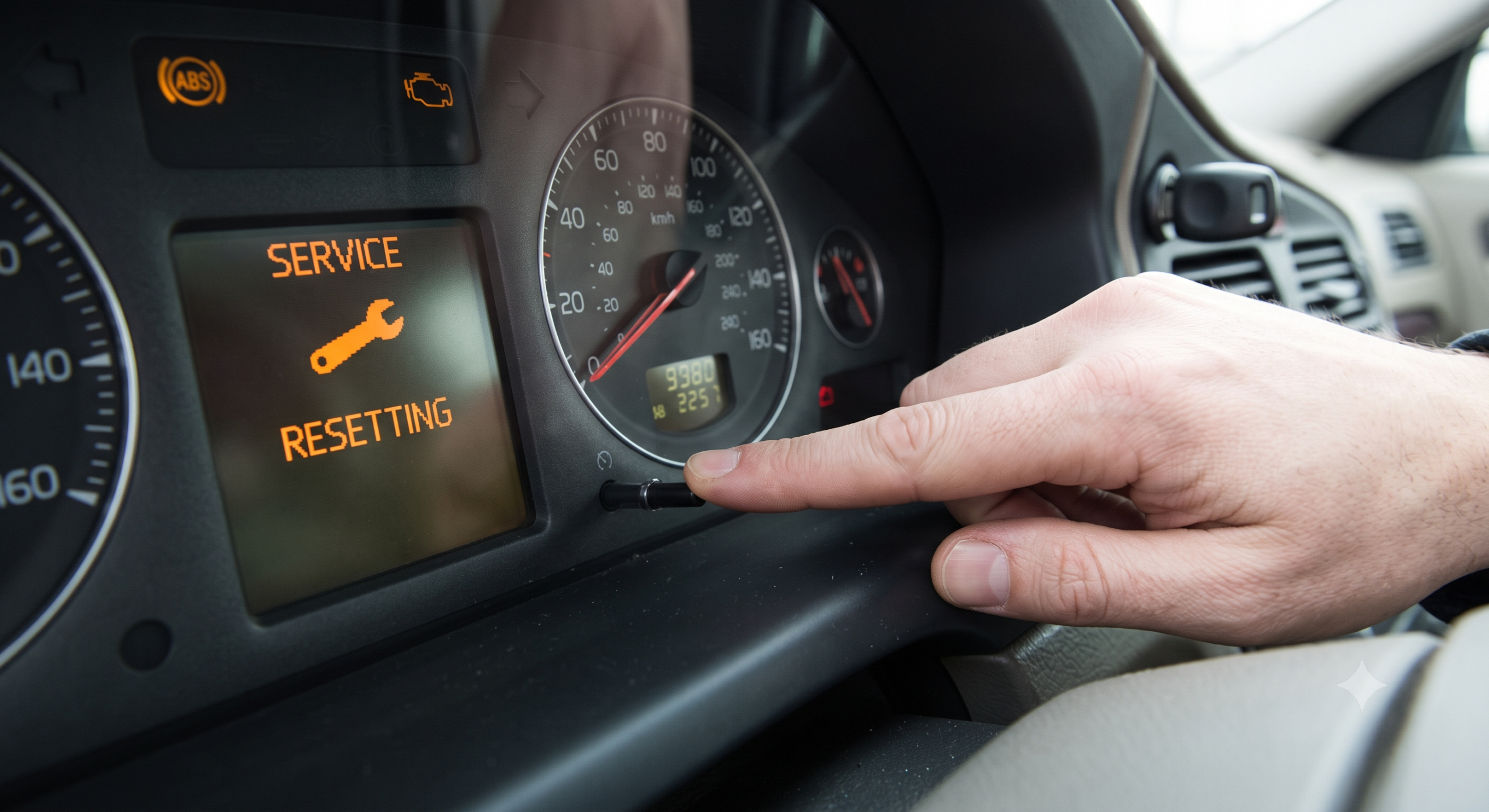
- Press and hold the trip odometer reset button (usually on the dash near the speedometer).
- Within about 2 seconds, turn the key to position II, keeping the button held.
- Keep holding until the orange warning triangle or “SRL” light starts flashing.
- Release the button within 5 seconds of it starting to flash.
- Listen for a chime — that’s your confirmation it worked.
- Turn the key off, then back on to verify the message is gone.
Expert Insight: The most common mistake here is releasing the button too early or too late. Owners consistently report the fix only “clicks” once they actually see the light blinking — not just glowing steadily.
How to Reset the Service Light — 2008–2016 XC70 (Push-Button Start)
Same basic idea, but you’re working with a start button instead of a key turn.
- Sit in the driver’s seat with the key fob present, but don’t press the brake pedal.
- Press the start button once (this powers up the electronics without starting the engine).
- Press and hold the trip odometer reset button.
- While still holding it, press the start button again and hold both.
- Wait for an audible beep and watch for the general warning indicator to illuminate.
- Release the trip button once you see that indicator light.
- Turn the vehicle off, then restart normally to confirm the message has cleared.
Real-world scenario: Say you just did your own oil change on a 2010 XC70 in the driveway. You don’t want to pay a dealer $40–50 just to clear a light you know isn’t a real fault — this five-minute manual reset is exactly what that situation calls for.
Comparing Your Reset Options
| Method | Cost | Time | Best For |
|---|---|---|---|
| Manual trip-button reset | Free | 1–2 minutes | DIYers, quick oil changes |
| OBD-II scan tool | $20–$80 (tool) | 5–10 minutes | Owners who also want to clear check-engine codes |
| Dealer or shop reset | $30–$60 | Same-day | People who’d rather not fiddle with buttons |
Pros & Cons by Reader Type
The confident DIYer
- Pros: Free, fast, no special tools, satisfying to do yourself
- Cons: Timing can be fussy on the first try; slightly different steps by year
The occasional home mechanic
- Pros: Works even if you only do this once a year
- Cons: Easy to forget the exact sequence between oil changes; worth bookmarking this page
The “just get it done” owner
- Pros: A quick shop visit guarantees it’s done right the first time
- Cons: Costs money for something that takes 30 seconds once you know it
Choose the manual reset if you’re comfortable following a precise button sequence and want to save the shop fee. Choose a scan tool instead if your XC70 also throws check-engine or ABS codes you want visibility into — a basic OBD-II reader covers both jobs.
When the Light Won’t Reset
Quick Tip: If the light comes back on within a day or two of resetting, don’t assume you did it wrong — check that your actual maintenance (oil, filters) was completed, since the SRI is just a mileage/time counter, not a diagnostic sensor.
A service light that won’t clear, or that returns almost immediately, usually points to one of these:
- You released the trip button at the wrong moment in the sequence
- The vehicle’s trip odometer needs to show at least a small distance traveled (some model years require this)
- There’s an actual triggered fault — in which case a scan tool reading is more useful than repeating the reset
Expert Insight: On very early XC70s (1998–1999 era carryover platforms), some owners report the manual reset doesn’t work at all, and a dealer-level scan tool is genuinely required.
FAQ
Does resetting the service light mean I don’t need to actually service my car? No — the light is just a reminder based on mileage or time, not proof that service happened. Reset it only after you’ve actually done the maintenance.
Can I reset the service light without a key, on a push-button XC70? You still need the key fob present in the car (for the anti-theft system to recognize it), but you don’t turn a physical key — you use the start button instead.
Why did the light come back on right after I reset it? Usually a timing mistake during the reset sequence. Try again, watching closely for the flashing indicator before releasing the button.
Is there a menu-based way to do this through the dashboard display? On the XC70, no — unlike some later Volvo models, this generation uses the physical trip-button method rather than an on-screen settings menu.
Will an OBD-II scanner reset the service light too? Yes, most generic and Volvo-specific OBD-II tools include an SRI reset function, and it’s a good backup if the manual method isn’t cooperating.
Key Takeaways
- The XC70 service light reset is a free, manual process — no dealer trip required.
- Know your generation: key ignition (2001–2007) vs. push-button start (2008–2016) use slightly different steps.
- Success depends on catching the flashing indicator at the right moment.
- A light that won’t clear may mean a real issue, not a failed reset attempt.
- Keep this sequence handy — you’ll use it every time you do your own oil change.
Next Step
Try the reset next time you finish an oil change — it takes less time than reading this FAQ section, and you’ll never need to pay for it again.