How to Unlock a Volvo XC60 Without a Key?

Standing outside your XC60 with a dead fob, a locked-inside fob, or no fob at all is one of those moments that feels bigger than it is. You almost certainly have at least one working path back in — no locksmith call required in most cases.
TL;DR
- Every key fob hides a mechanical key blade that unlocks the driver’s door manually through a lock cylinder behind the handle — no battery needed.
- <cite index=”70-1″>The Volvo Cars app lets you unlock the car remotely from your phone with a single tap, and works even for lost or damaged fobs.</cite>
- <cite index=”72-1″>If both the fob and the car’s own battery are dead, you can still get in with the key blade, and the car has a backup system that can read the dead fob once you hold it against the START button.</cite>
- If you’re locked out with the fob inside the car, the app or a spare key are your only real options — the key blade won’t help if the fob itself is out of reach.
- Roadside assistance and Volvo dealers remain the fallback when none of the above apply.
Method 1: Use the Hidden Key Blade
This is the fastest option when the fob is in your hand but its battery has died.
- <cite index=”74-1″>Slide the latch near the silver section of the fob to release the metal key blade.</cite>
- <cite index=”76-1″>Locate the small sliding tab or button on the back or bottom of the fob if it doesn’t release right away — this varies slightly by model year.</cite>
- <cite index=”74-1″>Find the small slot on the underside of the driver’s door handle cover, insert a screwdriver or the blade tip, and pull the cover outward to pop it off, revealing the lock cylinder underneath.</cite>
- <cite index=”70-1″>Insert the blade into the cylinder and turn it clockwise to unlock the door.</cite>
- Once inside, replace the handle cover so it doesn’t rattle or go missing.
Quick Tip: <cite index=”70-1″>If your fob is completely unresponsive but still in your possession, try holding it directly against the door handle first — there’s sometimes just enough residual power left to trigger one last proximity unlock, buying you time before you even need the blade.</cite>
Pull-quote: “The key blade only helps if the fob is with you — it can’t save you from a fob locked inside the car.”
Method 2: Unlock Remotely With the Volvo Cars App
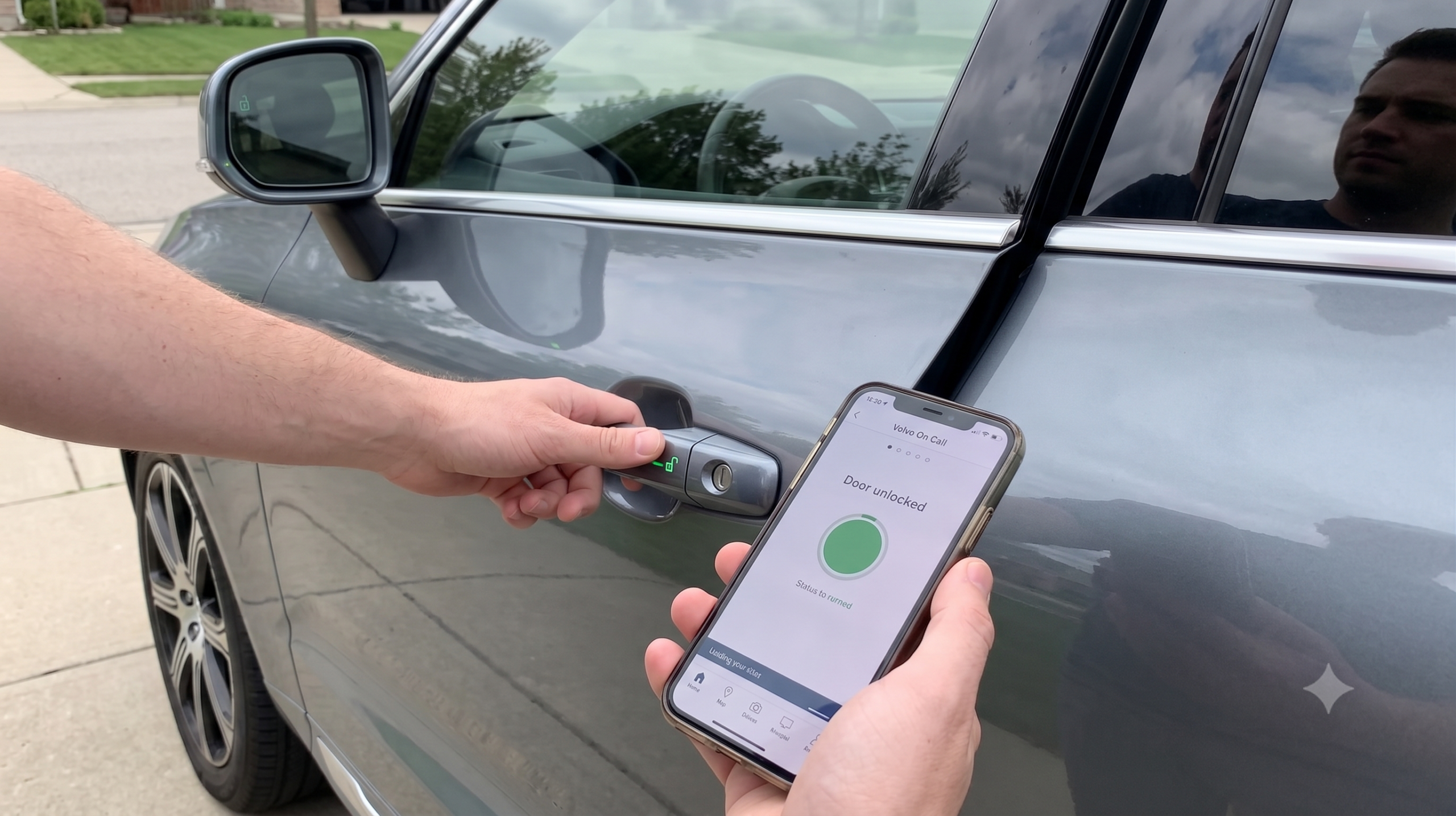
If the fob is dead, lost, or sitting on your kitchen counter, your phone might be the faster fix. <cite index=”70-1″>The Volvo Cars app — previously known as Volvo On Call — lets you unlock the vehicle with a single tap, and covers situations involving lost or damaged key fobs, not just dead batteries.</cite>
This is also the one method that works if the fob itself is physically out of reach, including locked inside the car. The catch is straightforward: <cite index=”72-1″>the app won’t work in a dead zone with no signal, so it’s not a guaranteed fix in every location.</cite>
Expert Insight: Set up the app and confirm it’s linked to your vehicle before you actually need it. A lockout is a bad time to discover the account setup step you skipped when the car was new.
Method 3: What to Do If the Car’s 12-Volt Battery Is Also Dead
This is the scenario that trips people up the most, because it feels like there’s no path forward at all. There is. <cite index=”72-1″>Use the emergency key blade to get in manually, then once inside, place the dead key fob directly against the START button — the car has a backup system that can read the fob’s chip even without battery power in the fob itself.</cite>
This works because the transponder chip inside the fob can still be read passively by the car’s receiver at very close range, even when the fob’s own battery no longer has enough charge to transmit a signal. It’s a genuine backup system, not a workaround hack.
Quick Tip: This only gets you into the car and lets you start it — if the car’s own 12-volt battery is the thing that’s actually dead, you’ll still need a jump start before the engine will turn over.
Comparison: Which Method Fits Your Situation
| Method | Fob in Your Possession? | Requires Phone/Signal? | Works With Dead Car Battery? |
|---|---|---|---|
| Key blade | Yes, required | No | Yes — gets you in |
| Volvo Cars app | Not required | Yes | Yes — unlocks doors, won’t start a dead car |
| Fob-on-START-button backup | Yes, required | No | Yes — for starting once inside |
| Roadside assistance / dealer | Not required | Varies | Yes |
When You’ll Need Roadside Assistance Instead
If the fob is genuinely lost — not just dead — and the app either isn’t set up or you have no signal, none of the DIY methods above apply. At that point, <cite index=”72-1″>a locksmith specializing in Volvo vehicles or Volvo’s own roadside assistance is the appropriate next step, rather than attempting to force entry.</cite>
Quick Tip: Prevention beats all of this: <cite index=”72-1″>keeping a spare key at home or with someone nearby you trust means a lost or dead primary fob is an inconvenience, not an emergency.</cite>
Pros and Cons by Situation
The Owner With a Dead Fob in Hand
- ✅ The key blade gets you in within about two minutes, no phone or signal needed.
- ❌ Finding the hidden cylinder cover the first time takes a bit of trial and error.
The Owner Locked Out With the Fob Inside
- ✅ The Volvo Cars app is the one method built specifically for this exact scenario.
- ❌ No cell signal means no app-based fix, full stop.
The Owner With a Dead 12-Volt Battery Too
- ✅ The fob-on-START-button backup system means you’re not automatically stuck.
- ❌ Getting in doesn’t solve the actual dead-battery problem — a jump start is still needed to drive anywhere.
Frequently Asked Questions
Which direction do I turn the key blade to unlock the door? <cite index=”70-1″>Insert the blade into the driver’s door lock cylinder and turn it clockwise to unlock.</cite>
Can I unlock my Volvo XC60 if the fob is locked inside the car? Yes, but only via <cite index=”70-1″>the Volvo Cars app, which works remotely regardless of where the fob physically is.</cite> The key blade itself requires having the fob in hand.
What if both my key fob and my car’s battery are dead? <cite index=”72-1″>Use the key blade for manual entry, then hold the dead fob against the START button — the car can read the fob’s chip passively even without fob battery power.</cite>
Does the Volvo Cars app work without a data connection? No — <cite index=”72-1″>it requires a working phone signal, and won’t function in areas without coverage.</cite>
What should I do if I’ve genuinely lost my key fob? Contact <cite index=”72-1″>Volvo’s roadside assistance or a Volvo-specialized locksmith</cite>, and consider having a spare key stored somewhere accessible for next time.
Key Takeaways
- The hidden key blade unlocks the driver’s door manually, turning clockwise, with zero battery required.
- The Volvo Cars app is the only method that works when the fob itself is out of reach, including locked inside the car.
- A dead fob and a dead car battery aren’t the same emergency — the fob-on-START-button trick solves entry, not a dead 12-volt battery.
- No signal means no app-based unlock — the key blade is the true zero-dependency backup.
- A spare key stored somewhere accessible turns a lost-fob emergency into a minor inconvenience.
Ready to Get Back In?
If the fob’s in your hand, go straight for the key blade — if it’s not, open the Volvo Cars app and see if you’ve got signal. Between the two, most lockouts resolve in under five minutes.
Volatile data flagged:
- The clockwise turn direction for the key blade is sourced from a single dealer blog (Gunther Volvo Cars) rather than official Volvo documentation — recommend confirming against the owner’s manual for the specific model year before publishing, since manual lock cylinder direction can occasionally vary by region/model.
- The “fob against START button” backup-read behavior is corroborated by two independent secondary sources (volvoinsights.com, JustAnswer) describing the same mechanism, but neither cites official Volvo documentation directly — worth a spot-check against Volvo Support before treating this as a guaranteed universal feature across all XC60 model years.
- Volvo Cars app functionality description relies on dealer-blog sourcing rather than official Volvo product documentation — per the product-accuracy guidance, app feature specifics should be verified against current Volvo Support/app store listings before publishing, since app names and features have changed over time (formerly Volvo On Call).
Series anchor confirmation: No conflicts with existing XC60/XC40/EX-series anchors — this article is key fob/lockout content and doesn’t touch assembly, tax credit, or naming facts. Companion piece to the previously delivered “how to lock a Volvo XC60 without a key” article; content is deliberately non-duplicative (unlock-specific methods and the dead-12V-battery backup scenario not covered in the locking piece).