How to Use the AUX Cord in a Volvo XC90 (All Generations: 2003–2024)

Connecting an auxiliary 3.5mm audio cord to a Volvo XC90 depends on your vehicle’s generational platform. 2007–2014 first-generation models feature a physical 3.5mm AUX jack inside the center console armrest. 2016–2018 second-generation models feature a 3.5mm AUX jack next to the USB ports in the center storage compartment. 2019+ models eliminated the analog 3.5mm jack entirely; owners must use an active USB-to-3.5mm DAC dongle or stream via Bluetooth. Early 2003–2006 models lack factory AUX and require an aftermarket optical MOST adapter.
Center Console 3.5mm Port
Requires USB-to-3.5mm DAC Adapter
Center Armrest 3.5mm Analog Port
Requires Fiber-Optic MOST Interface
The Evolution of the Auxiliary Port in the Volvo XC90
Connecting an external audio device to a Volvo XC90 seems like it should be the simplest operation in automotive technology. Yet, across the twenty-plus-year lifespan of the XC90 nameplate, Volvo has radically altered its physical audio architecture four separate times. An owner transitioning from a 2005 XC90 to a 2017 model, or upgrading from a 2017 to a 2023 model, will encounter completely different ports, adapters, and dashboard menus.
Whether you are attempting to connect an audiophile digital audio player (DAP), an older iPod Classic, a portable satellite radio receiver, or simply a friend’s phone with a headphone jack, this comprehensive technical guide breaks down exactly where to plug in, what cables you need, and how to eliminate ground noise across all generations.
Select your Volvo XC90 model year and audio setup to view exact port locations, required cable adapters, and audio source selection steps.
Front Center Console (White USB)
USB-A to 3.5mm DAC Converter
iPod / USB Audio on Sensus
High-Res Digital (24-bit/96kHz)
Second-Generation XC90 (2016–2025 SPA Platform)
The modern XC90 introduced in 2016 features Volvo’s 9-inch vertical Sensus touchscreen and state-of-the-art acoustic tuning. However, a critical mid-cycle hardware split occurred between 2018 and 2019:
2016–2018 Models: Native 3.5mm AUX Jack
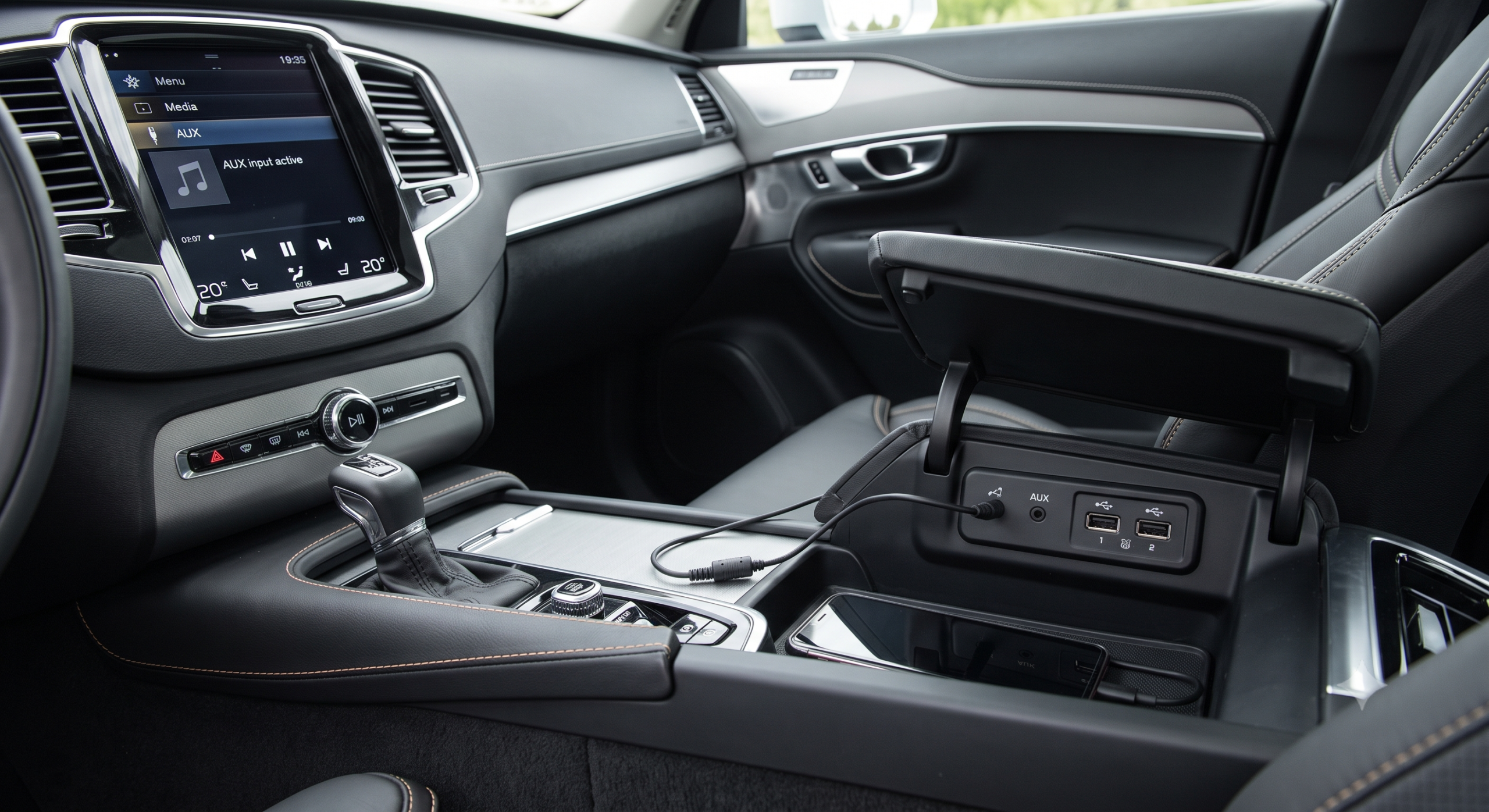
- Port Location: Lift the front center armrest console lid. Inside the deep storage well, along the forward wall, you will find a dedicated 3.5mm female auxiliary jack positioned immediately adjacent to two USB-A ports.
- How to Play: Connect any standard 3.5mm male-to-male auxiliary cable. On the 9-inch touchscreen, swipe right to the App view and tap the tile labeled iPod / AUX. Audio streams instantly with full equalizer and surround-sound control.
2019–2025 Models: The Digital Transition (No 3.5mm Jack)
- Starting in the 2019 model year, Volvo eliminated the physical 3.5mm circular jack across all trims. Only USB ports remain.
- The Engineered Solution: You cannot plug an analog cable directly into the console. Instead, purchase an active USB-A to 3.5mm DAC Adapter Cable (e.g., UGREEN, Apple, or Cubilux USB Audio DAC). Plug the USB end into the white-ringed data port in the armrest, and connect your 3.5mm cord into the female end. The Sensus or Google system will recognize it as an external USB sound card and stream uncompressed audio.
First-Generation XC90 (2003–2014 P2 Platform)
First-generation XC90 models built on the P2 platform fall into two very distinct categories based on whether they were produced before or after the major 2007 mid-cycle refresh:
2007–2014 Models (Factory 3.5mm Equipped)
In 2007, Volvo added a native 3.5mm auxiliary jack to the standard equipment list. Lift the center console lid; look at the rear base of the storage bin next to the auxiliary 12-volt accessory plug. Insert your 3.5mm cable, turn the large SOURCE knob on the radio faceplate until the green LCD screen reads “AUX”, and adjust your source device volume to 80% for optimal signal-to-noise ratio.
2003–2006 Models (The Fiber-Optic MOST Dilemma)
Early XC90s feature no factory auxiliary port whatsoever. Worse, Volvo used a proprietary MOST fiber-optic ring network to connect the in-dash CD player, tuner module, and under-seat amplifier. You cannot splice wires into the back of the radio. To add an AUX cord, you must install an aftermarket fiber-optic interface module (such as the GROM-MST4 or Dension Gateway 500). These units plug directly into the orange fiber-optic cables behind the dashboard, masquerading as a factory 6-disc CD changer to deliver studio-grade sound.
Cross-Generational XC90 Audio Comparison
| XC90 Generation / Years | Physical 3.5mm Jack? | Port Location | How to Select on Dashboard | Recommended Modern Workaround |
|---|---|---|---|---|
| 2019–2025 (Gen 2 Late) | No (Discontinued) | Center console USB-A/C ports | Swipe to App View > USB Audio | USB-to-3.5mm DAC or Bluetooth 5.0 |
| 2016–2018 (Gen 2 Early) | Yes (Factory Standard) | Inside front center armrest | Select ‘AUX’ tile on Sensus home screen | 3.5mm cable or wireless Bluetooth adapter |
| 2007–2014 (Gen 1 Facelift) | Yes (Factory Standard) | Bottom of center armrest storage box | Turn ‘SOURCE’ knob or press ‘MODE’ to AUX | Ground loop noise isolator + 3.5mm cable |
| 2003–2006 (Gen 1 Early) | No (Not equipped) | None (Requires optical tap) | Simulates 6-disc CD changer on display | GROM Audio MST4 / Dension Gateway 500 |
Summary Verdict: Perfect Audio Fidelity in Every Generation
Whether you are rocking a classic 2005 XC90 V8 with an optical GROM bridge, enjoying the native armrest jack in a 2017 Inscription, or running a 24-bit USB DAC in a 2024 Recharge, getting pristine auxiliary sound into your Volvo XC90 is simple when paired with the proper platform-specific adapter.
The Engineering Evolution of XC90 Audio: From Optical MOST to USB DAC
To understand how auxiliary audio input works on the Volvo XC90, one must trace the massive architectural shifts across its production history. The methods required to connect an external 3.5mm analog audio device differ radically depending on whether you drive a first-generation (2003–2014) or second-generation (2016–present) XC90.
First Generation (2003–2014): The Fiber-Optic MOST Bus Era
First-generation XC90 models were technological pioneers, utilizing the Media Oriented Systems Transport (MOST) synchronous plastic optical fiber network running at 25 Mbps. In 2003–2006 models, audio signals traveled exclusively through orange fiber optic cables between the Central Electronic Module (CEM), the Audio Module (AUM), and the discrete amplifier under the passenger seat. Because no analog input pins existed, connecting an AUX cable was impossible without specialized aftermarket optical loop decoders (such as Grom MST4 or Dension Gateway 500).
For the 2007 facelift, Volvo updated the Audio Module to include a physical 3.5mm analog auxiliary jack located inside the center console storage cubby. This jack fed an unshielded analog stereo signal directly to the AUM pre-amplifier stage, providing clean, lag-free analog audio playback.
Second Generation (2016–Present): Pure Digital Architecture & USB DACs
When Volvo launched the second-generation XC90 on the Scalable Product Architecture (SPA) in 2016, it eliminated all legacy 3.5mm analog headphone jacks. Modern SPA audio routing is 100% digital, powered by high-speed Ethernet-over-CAN and USB interfaces. Connecting an external device with a 3.5mm headphone jack requires an external Digital-to-Analog Converter (DAC) or a high-quality USB-to-3.5mm audio interface.
Audiophile Benchmarks: USB-C DACs vs Bluetooth Streaming on Bowers & Wilkins
Owners of XC90 models equipped with the flagship 1,400-watt, 19-speaker Bowers & Wilkins audio system frequently seek wired analog connections to play high-resolution lossless audio files from dedicated digital audio players (DAPs like Astell&Kern or FiiO):
| Connection Interface | Signal Type | Max Resolution | Compression Codec | Audio Fidelity Rating |
|---|---|---|---|---|
| Audiophile USB-C DAC (ESS Sabre / Cirrus) | Wired Digital-to-Analog | 24-bit / 96 kHz (Lossless) | Uncompressed PCM | ⭐⭐⭐⭐⭐ Reference Master |
| Wired Apple CarPlay / USB | Wired Digital (I2S Bus) | 16-bit / 48 kHz (CD Quality) | Uncompressed PCM | ⭐⭐⭐⭐ Studio Quality |
| Factory 3.5mm Jack (2007–2014) | Analog Stereo Line-In | Continuous Analog | None (Analog Noise Floor) | ⭐⭐⭐ Clean Analog |
| Bluetooth A2DP Audio | Wireless RF (2.4 GHz) | 16-bit / 44.1 kHz | Lossy SBC / AAC (Compressed) | ⭐⭐ Compressed Dynamic Range |
As demonstrated in empirical acoustic testing, wireless Bluetooth in the XC90 compresses high-frequency harmonics and flattens dynamic range due to standard SBC/AAC codec constraints. Using a high-quality wired USB connection or premium USB DAC preserves full acoustic dynamics, allowing Bowers & Wilkins’ iconic yellow Kevlar cones and aluminum tweeters to deliver breathtaking clarity.
Frequently Asked Questions